1
2
3
4
5
6
7
8
9
10
11
12
13
14
15
16
17
18
19
20
21
22
23
24
25
26
27
28
29
30
31
32
33
34
35
36
37
38
39
40
41
42
43
44
45
46
47
48
49
50
51
52
53
54
55
56
57
58
59
60
61
62
63
64
65
66
67
68
69
70
71
72
73
74
75
76
77
78
79
80
81
82
83
84
85
86
87
88
89
90
91
92
93
94
95
96
97
98
99
100
101
102
103
104
105
106
107
108
109
110
111
112
113
114
115
116
117
118
119
120
121
122
123
124
125
126
127
128
129
130
131
132
133
134
135
136
137
138
139
140
141
142
143
144
145
146
147
148
149
150
151
152
153
154
155
156
157
158
159
160
161
162
163
164
|
# PostCSS image-set() Function [<img src="https://postcss.github.io/postcss/logo.svg" alt="PostCSS Logo" width="90" height="90" align="right">][postcss]
[![NPM Version][npm-img]][npm-url]
[![Build Status][cli-img]][cli-url]
[<img alt="Discord" src="https://shields.io/badge/Discord-5865F2?logo=discord&logoColor=white">][discord]
<br><br>
[<img alt="Baseline Status" src="https://cssdb.org/images/badges-baseline/image-set-function.svg" height="20">][css-url]
[![CSS Standard Status][css-img]][css-url]
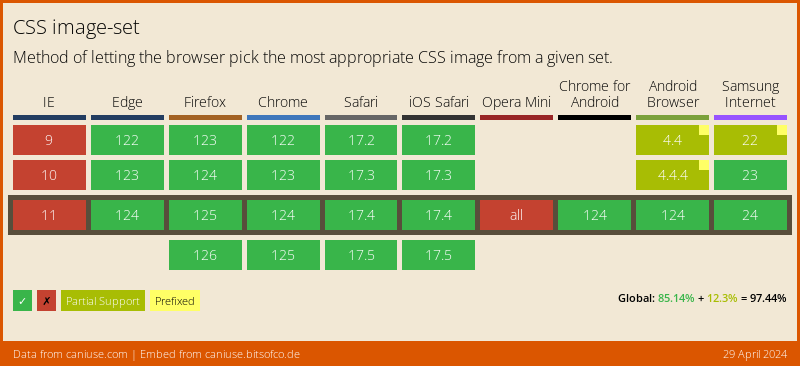
[PostCSS image-set() Function] lets you display resolution-dependent images
using the `image-set()` function in CSS, following the [CSS Images]
specification.
[](https://caniuse.com/#feat=css-image-set)
```pcss
.example {
background-image: image-set(
url(img.png) 1x,
url(img@2x.png) 2x,
url(img@print.png) 600dpi
);
}
/* becomes */
.example {
background-image: url(img.png);
}
@media (-webkit-min-device-pixel-ratio: 2), (min-resolution: 192dpi) {
.example {
background-image: url(img@2x.png);
}
}
@media (-webkit-min-device-pixel-ratio: 6.25), (min-resolution: 600dpi) {
.example {
background-image: url(my@print.png);
}
}
.example {
background-image: image-set(
url(img.png) 1x,
url(img@2x.png) 2x,
url(img@print.png) 600dpi
);
}
```
## Usage
Add [PostCSS image-set() Function] to your project:
```bash
npm install postcss-image-set-function --save-dev
```
Use [PostCSS image-set() Function] as a [PostCSS] plugin:
```js
const postcss = require('postcss');
const postcssImageSetFunction = require('postcss-image-set-function');
postcss([
postcssImageSetFunction(/* pluginOptions */)
]).process(YOUR_CSS /*, processOptions */);
```
[PostCSS image-set() Function] runs in all Node environments, with special
instructions for:
| [Node](INSTALL.md#node) | [PostCSS CLI](INSTALL.md#postcss-cli) | [Webpack](INSTALL.md#webpack) | [Gulp](INSTALL.md#gulp) | [Grunt](INSTALL.md#grunt) |
| --- | --- | --- | --- | --- |
## Options
### preserve
The `preserve` option determines whether the original declaration using
`image-set()` is preserved. By default, it is preserved.
```js
postcssImageSetFunction({ preserve: false })
```
```pcss
.example {
background-image: image-set(
url(img.png) 1x,
url(img@2x.png) 2x,
url(img@print.png) 600dpi
);
}
/* becomes */
@media (-webkit-min-device-pixel-ratio: 1), (min-resolution: 96dpi) {
.example {
background-image: url(img.png);
}
}
@media (-webkit-min-device-pixel-ratio: 2), (min-resolution: 192dpi) {
.example {
background-image: url(img@2x.png);
}
}
@media (-webkit-min-device-pixel-ratio: 6.25), (min-resolution: 600dpi) {
.example {
background-image: url(my@print.png);
}
}
```
### onInvalid
The `onInvalid` option determines how invalid usage of `image-set()` should be
handled. By default, invalid usages of `image-set()` are ignored.
They can be configured to emit a warning with `warn` or throw an exception with `throw`.
```js
postcssImageSetFunction({ onInvalid: 'warn' }) // warn on invalid usages
```
```js
postcssImageSetFunction({ onInvalid: 'throw' }) // throw on invalid usages
```
## Image Resolution
The `image-set()` function allows an author to provide multiple resolutions of
an image and let the browser decide which is most appropriate in a given
situation. The `image-set()` also never fails to choose an image; the
`<resolution>` just helps determine which of the images is chosen.
Since this plugin is not a browser, the image options are sorted by device
pixel ratio and the lowest ratio is used as the default, while the remaining
images are pushed behind media queries.
Therefore, this plugin can only approximate native browser behavior. While
images should typically match the resolution as the device they’re being viewed
in, other factors can affect the chosen image. For example, if the user is on a
slow mobile connection, the browser may prefer to select a lower-res image
rather than wait for a larger, resolution-matching image to load.
[cli-img]: https://github.com/csstools/postcss-plugins/workflows/test/badge.svg
[cli-url]: https://github.com/csstools/postcss-plugins/actions/workflows/test.yml?query=workflow/test
[css-img]: https://cssdb.org/images/badges/image-set-function.svg
[css-url]: https://cssdb.org/#image-set-function
[discord]: https://discord.gg/bUadyRwkJS
[npm-img]: https://img.shields.io/npm/v/postcss-image-set-function.svg
[npm-url]: https://www.npmjs.com/package/postcss-image-set-function
[CSS Images]: https://drafts.csswg.org/css-images-4/#image-set-notation
[Gulp PostCSS]: https://github.com/postcss/gulp-postcss
[Grunt PostCSS]: https://github.com/nDmitry/grunt-postcss
[PostCSS]: https://github.com/postcss/postcss
[PostCSS Loader]: https://github.com/postcss/postcss-loader
[PostCSS image-set() Function]: https://github.com/csstools/postcss-plugins/tree/main/plugins/postcss-image-set-function
|
