
diff options
Diffstat (limited to 'node_modules/postcss-custom-properties/README.md')
| -rw-r--r-- | node_modules/postcss-custom-properties/README.md | 186 |
1 files changed, 186 insertions, 0 deletions
diff --git a/node_modules/postcss-custom-properties/README.md b/node_modules/postcss-custom-properties/README.md new file mode 100644 index 00000000..ffd5a35e --- /dev/null +++ b/node_modules/postcss-custom-properties/README.md @@ -0,0 +1,186 @@ +# PostCSS Custom Properties [<img src="https://postcss.github.io/postcss/logo.svg" alt="PostCSS Logo" width="90" height="90" align="right">][PostCSS] + +[<img alt="npm version" src="https://img.shields.io/npm/v/postcss-custom-properties.svg" height="20">][npm-url] [<img alt="CSS Standard Status" src="https://cssdb.org/images/badges/custom-properties.svg" height="20">][css-url] [<img alt="Build Status" src="https://github.com/csstools/postcss-plugins/workflows/test/badge.svg" height="20">][cli-url] [<img alt="Discord" src="https://shields.io/badge/Discord-5865F2?logo=discord&logoColor=white">][discord] + +```bash +npm install postcss-custom-properties --save-dev +``` + +[PostCSS Custom Properties] lets you use Custom Properties in CSS, following +the [CSS Custom Properties] specification. + +[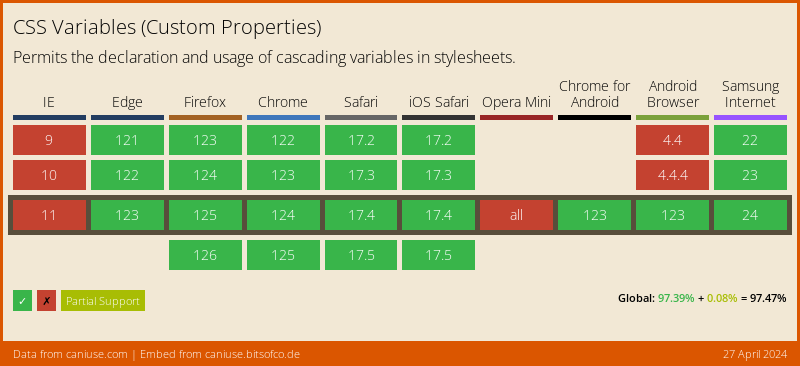](https://caniuse.com/#feat=css-variables) + +```pcss +:root { + --color-blue-dark: rgb(0, 61, 184); + --color-blue-light: rgb(0, 217, 255); + --color-pink: rgb(255, 192, 211); + --text-color: var(--color-pink); +} + +.element { + /* custom props */ + --border-color: var(--color-blue-light); + + /* props */ + border: 1px solid var(--border-color); + color: var(--text-color); +} + +.element--dark { + --border-color: var(--color-blue-dark); +} + +/* becomes */ + +:root { + --color-blue-dark: rgb(0, 61, 184); + --color-blue-light: rgb(0, 217, 255); + --color-pink: rgb(255, 192, 211); + --text-color: var(--color-pink); +} + +.element { + /* custom props */ + --border-color: var(--color-blue-light); + + /* props */ + border: 1px solid rgb(0, 217, 255); + border: 1px solid var(--border-color); + color: rgb(255, 192, 211); + color: var(--text-color); +} + +.element--dark { + --border-color: var(--color-blue-dark); +} +``` + +**Note:** +- Only processes variables that were defined in the `:root` or `html` selector. +- Locally defined variables will be used as fallbacks only within the same rule, but not elsewhere. +- Fallback values in `var()` will be used if the variable was not defined in the `:root` or `html` selector. + +## Usage + +Add [PostCSS Custom Properties] to your project: + +```bash +npm install postcss postcss-custom-properties --save-dev +``` + +Use it as a [PostCSS] plugin: + +```js +const postcss = require('postcss'); +const postcssCustomProperties = require('postcss-custom-properties'); + +postcss([ + postcssCustomProperties(/* pluginOptions */) +]).process(YOUR_CSS /*, processOptions */); +``` + +[PostCSS Custom Properties] runs in all Node environments, with special +instructions for: + +- [Node](INSTALL.md#node) +- [PostCSS CLI](INSTALL.md#postcss-cli) +- [PostCSS Load Config](INSTALL.md#postcss-load-config) +- [Webpack](INSTALL.md#webpack) +- [Next.js](INSTALL.md#nextjs) +- [Gulp](INSTALL.md#gulp) +- [Grunt](INSTALL.md#grunt) + +## Options + +### preserve + +The `preserve` option determines whether properties using +custom properties should be preserved in their original form. By default these are preserved. + +Custom property declarations are always preserved only `var()` functions can be omitted. + +```js +postcssCustomProperties({ preserve: false }) +``` + +```pcss +:root { + --color-blue-dark: rgb(0, 61, 184); + --color-blue-light: rgb(0, 217, 255); + --color-pink: rgb(255, 192, 211); + --text-color: var(--color-pink); +} + +.element { + /* custom props */ + --border-color: var(--color-blue-light); + + /* props */ + border: 1px solid var(--border-color); + color: var(--text-color); +} + +.element--dark { + --border-color: var(--color-blue-dark); +} + +/* becomes */ + +:root { + --color-blue-dark: rgb(0, 61, 184); + --color-blue-light: rgb(0, 217, 255); + --color-pink: rgb(255, 192, 211); + --text-color: var(--color-pink); +} + +.element { + /* custom props */ + --border-color: var(--color-blue-light); + + /* props */ + border: 1px solid var(--border-color); + color: rgb(255, 192, 211); +} + +.element--dark { + --border-color: var(--color-blue-dark); +} +``` + +## Modular CSS Processing + +If you're using Modular CSS such as, CSS Modules, `postcss-loader` or `vanilla-extract` to name a few, you'll probably +notice that custom properties are not being resolved. This happens because each file is processed separately so +unless you import the custom properties definitions in each file, they won't be resolved. + +To overcome this, we recommend using the [PostCSS Global Data](https://github.com/csstools/postcss-plugins/tree/main/plugins/postcss-global-data#readme) +plugin which allows you to pass a list of files that will be globally available. The plugin won't inject any extra code +in the output but will provide the context needed to resolve custom properties. + +For it to run it needs to be placed before the [PostCSS Custom Properties] plugin. + +```js +const postcss = require('postcss'); +const postcssCustomProperties = require('postcss-custom-properties'); +const postcssGlobalData = require('@csstools/postcss-global-data'); + +postcss([ + postcssGlobalData({ + files: [ + 'path/to/your/custom-selectors.css' + ] + }), + postcssCustomProperties(/* pluginOptions */) +]).process(YOUR_CSS /*, processOptions */); +``` + +[cli-url]: https://github.com/csstools/postcss-plugins/actions/workflows/test.yml?query=workflow/test +[css-url]: https://cssdb.org/#custom-properties +[discord]: https://discord.gg/bUadyRwkJS +[npm-url]: https://www.npmjs.com/package/postcss-custom-properties + +[PostCSS]: https://github.com/postcss/postcss +[PostCSS Custom Properties]: https://github.com/csstools/postcss-plugins/tree/main/plugins/postcss-custom-properties +[CSS Custom Properties]: https://www.w3.org/TR/css-variables-1/ |