
diff options
Diffstat (limited to 'dot-oh-my-zsh/custom/plugins/fzf/ADVANCED.md')
| m--------- | dot-oh-my-zsh | 0 | ||||
| -rw-r--r-- | dot-oh-my-zsh/custom/plugins/fzf/ADVANCED.md | 609 |
2 files changed, 0 insertions, 609 deletions
diff --git a/dot-oh-my-zsh b/dot-oh-my-zsh new file mode 160000 +Subproject 6fe84bf5c82da7b1f6d7c5ec3e5c447721ac8ce diff --git a/dot-oh-my-zsh/custom/plugins/fzf/ADVANCED.md b/dot-oh-my-zsh/custom/plugins/fzf/ADVANCED.md deleted file mode 100644 index dcff947c..00000000 --- a/dot-oh-my-zsh/custom/plugins/fzf/ADVANCED.md +++ /dev/null @@ -1,609 +0,0 @@ -Advanced fzf examples -====================== - -*(Last update: 2022/08/25)* - -<!-- vim-markdown-toc GFM --> - -* [Introduction](#introduction) -* [Screen Layout](#screen-layout) - * [`--height`](#--height) - * [`fzf-tmux`](#fzf-tmux) - * [Popup window support](#popup-window-support) -* [Dynamic reloading of the list](#dynamic-reloading-of-the-list) - * [Updating the list of processes by pressing CTRL-R](#updating-the-list-of-processes-by-pressing-ctrl-r) - * [Toggling between data sources](#toggling-between-data-sources) -* [Ripgrep integration](#ripgrep-integration) - * [Using fzf as the secondary filter](#using-fzf-as-the-secondary-filter) - * [Using fzf as interative Ripgrep launcher](#using-fzf-as-interative-ripgrep-launcher) - * [Switching to fzf-only search mode](#switching-to-fzf-only-search-mode) - * [Switching between Ripgrep mode and fzf mode](#switching-between-ripgrep-mode-and-fzf-mode) -* [Log tailing](#log-tailing) -* [Key bindings for git objects](#key-bindings-for-git-objects) - * [Files listed in `git status`](#files-listed-in-git-status) - * [Branches](#branches) - * [Commit hashes](#commit-hashes) -* [Color themes](#color-themes) - * [Generating fzf color theme from Vim color schemes](#generating-fzf-color-theme-from-vim-color-schemes) - -<!-- vim-markdown-toc --> - -Introduction ------------- - -fzf is an interactive [Unix filter][filter] program that is designed to be -used with other Unix tools. It reads a list of items from the standard input, -allows you to select a subset of the items, and prints the selected ones to -the standard output. You can think of it as an interactive version of *grep*, -and it's already useful even if you don't know any of its options. - -```sh -# 1. ps: Feed the list of processes to fzf -# 2. fzf: Interactively select a process using fuzzy matching algorithm -# 3. awk: Take the PID from the selected line -# 3. kill: Kill the process with the PID -ps -ef | fzf | awk '{print $2}' | xargs kill -9 -``` - -[filter]: https://en.wikipedia.org/wiki/Filter_(software) - -While the above example succinctly summarizes the fundamental concept of fzf, -you can build much more sophisticated interactive workflows using fzf once you -learn its wide variety of features. - -- To see the full list of options and features, see `man fzf` -- To see the latest additions, see [CHANGELOG.md](CHANGELOG.md) - -This document will guide you through some examples that will familiarize you -with the advanced features of fzf. - -Screen Layout -------------- - -### `--height` - -fzf by default opens in fullscreen mode, but it's not always desirable. -Oftentimes, you want to see the current context of the terminal while using -fzf. `--height` is an option for opening fzf below the cursor in -non-fullscreen mode so you can still see the previous commands and their -results above it. - -```sh -fzf --height=40% -``` - -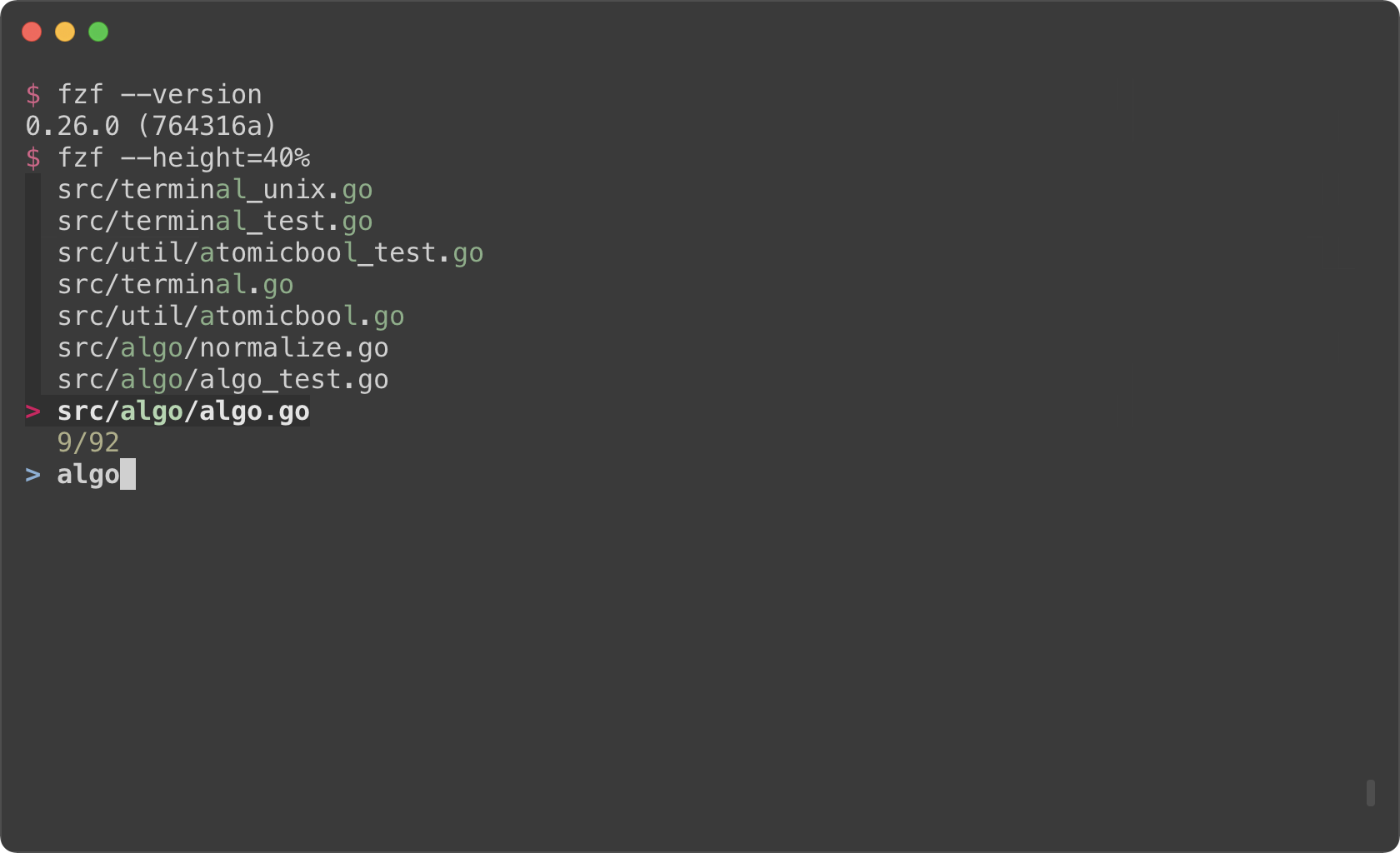 - -You might also want to experiment with other layout options such as -`--layout=reverse`, `--info=inline`, `--border`, `--margin`, etc. - -```sh -fzf --height=40% --layout=reverse -fzf --height=40% --layout=reverse --info=inline -fzf --height=40% --layout=reverse --info=inline --border -fzf --height=40% --layout=reverse --info=inline --border --margin=1 -fzf --height=40% --layout=reverse --info=inline --border --margin=1 --padding=1 -``` - -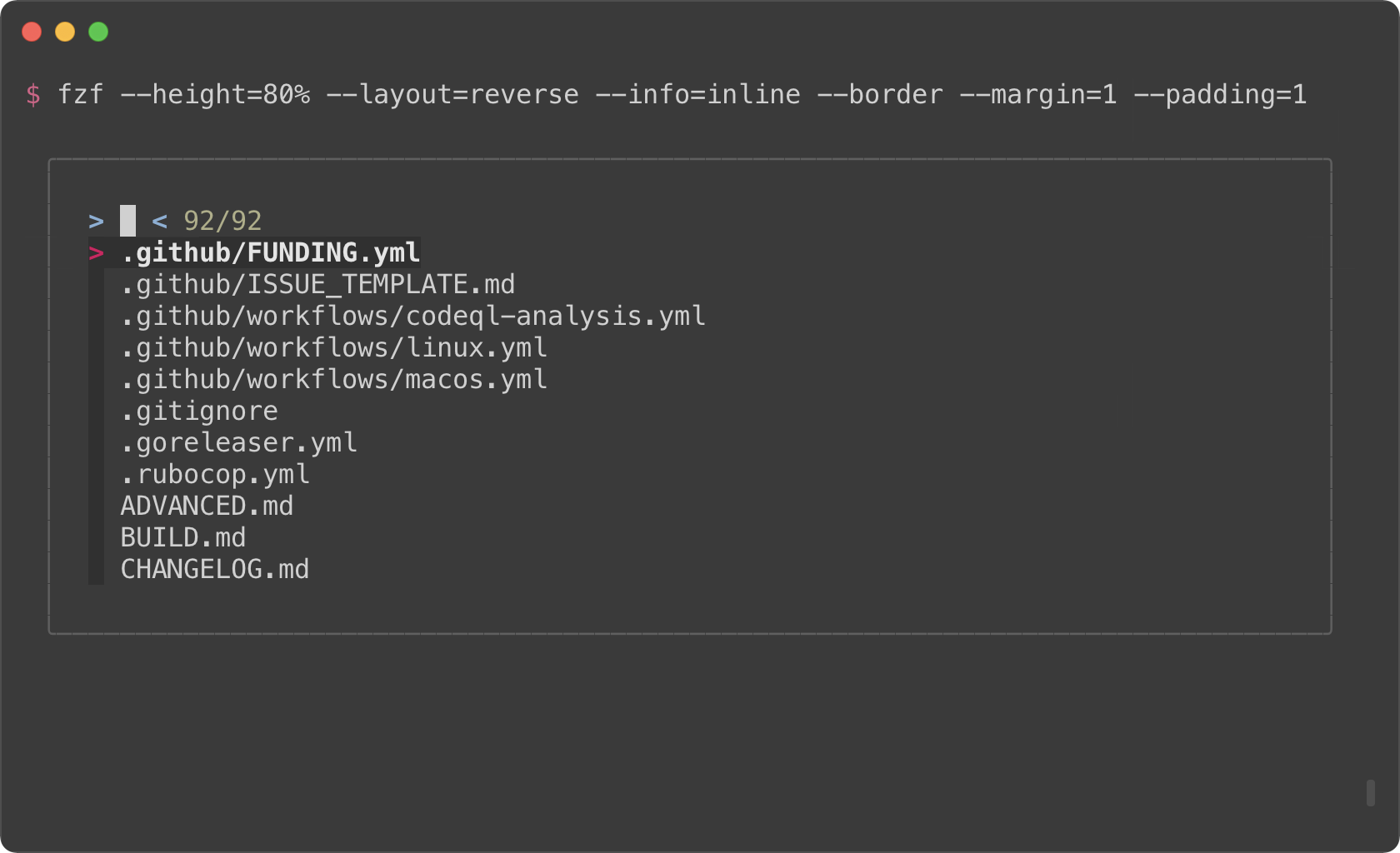 - -*(See `Layout` section of the man page to see the full list of options)* - -But you definitely don't want to repeat `--height=40% --layout=reverse ---info=inline --border --margin=1 --padding=1` every time you use fzf. You -could write a wrapper script or shell alias, but there is an easier option. -Define `$FZF_DEFAULT_OPTS` like so: - -```sh -export FZF_DEFAULT_OPTS="--height=40% --layout=reverse --info=inline --border --margin=1 --padding=1" -``` - -### `fzf-tmux` - -Before fzf had `--height` option, we would open fzf in a tmux split pane not -to take up the whole screen. This is done using `fzf-tmux` script. - -```sh -# Open fzf on a tmux split pane below the current pane. -# Takes the same set of options. -fzf-tmux --layout=reverse -``` - -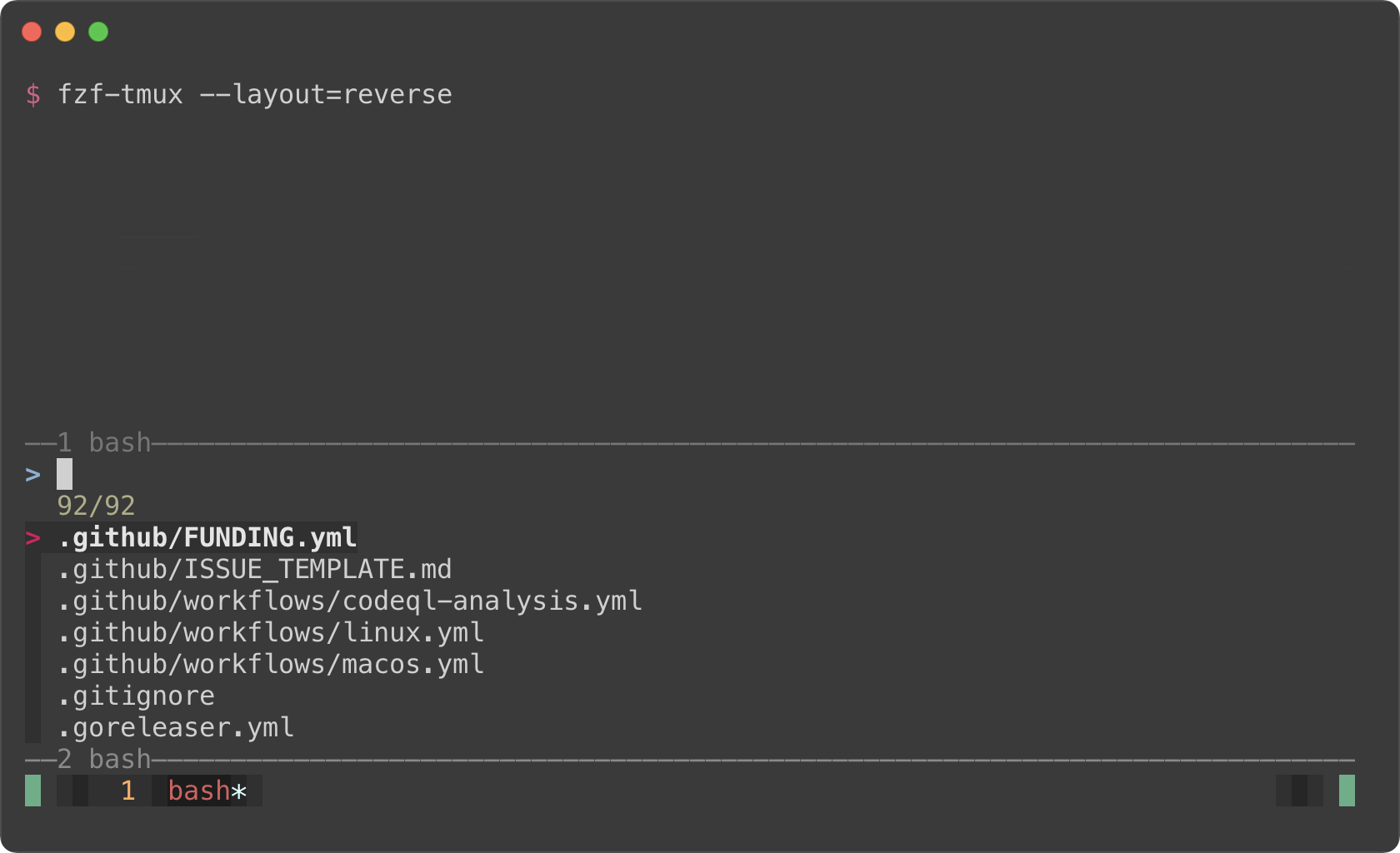 - -The limitation of `fzf-tmux` is that it only works when you're on tmux unlike -`--height` option. But the advantage of it is that it's more flexible. -(See `man fzf-tmux` for available options.) - -```sh -# On the right (50%) -fzf-tmux -r - -# On the left (30%) -fzf-tmux -l30% - -# Above the cursor -fzf-tmux -u30% -``` - -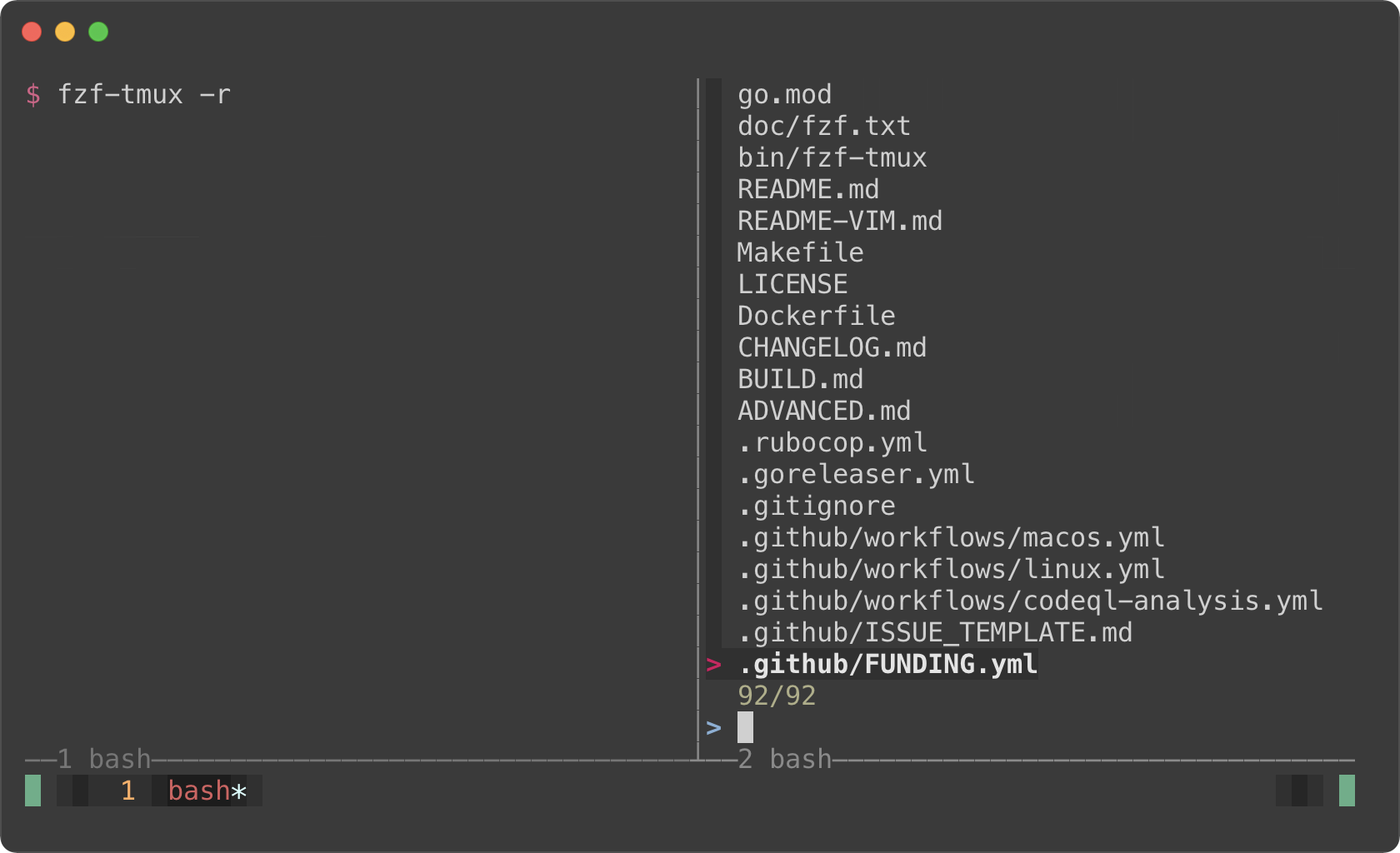 - -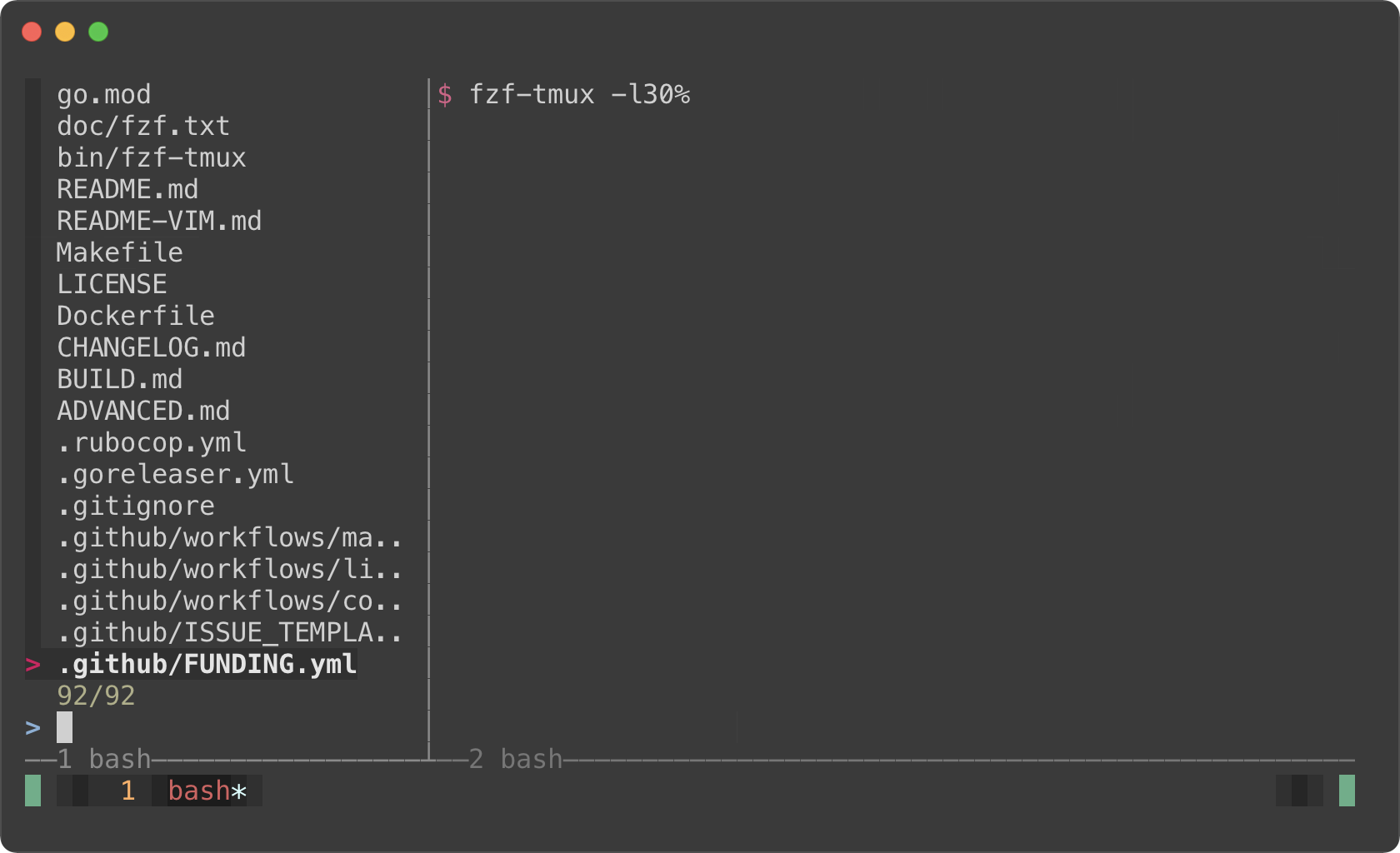 - -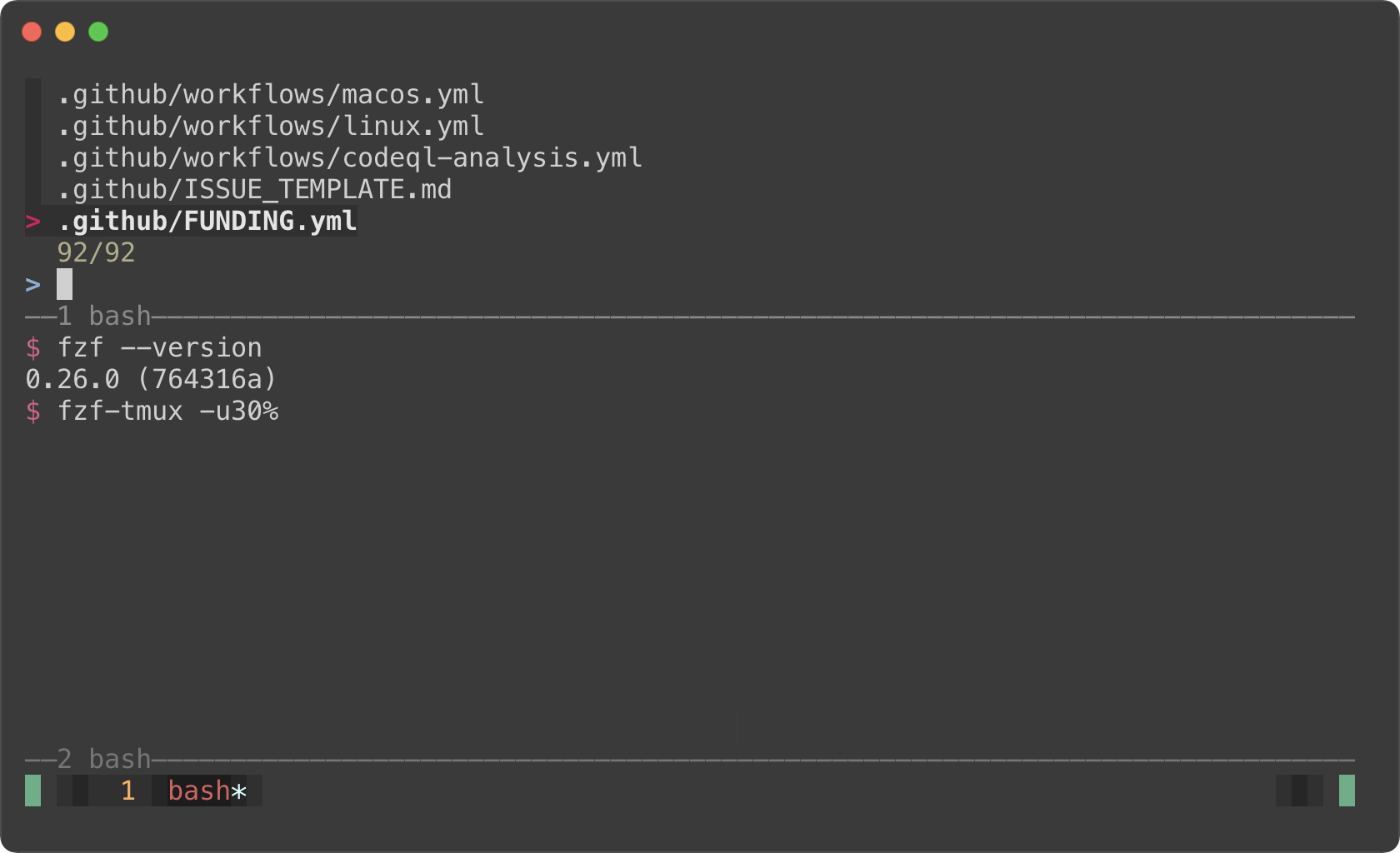 - -#### Popup window support - -But here's the really cool part; tmux 3.2 added support for popup windows. So -you can open fzf in a popup window, which is quite useful if you frequently -use split panes. - -```sh -# Open tmux in a tmux popup window (default size: 50% of the screen) -fzf-tmux -p - -# 80% width, 60% height -fzf-tmux -p 80%,60% -``` - -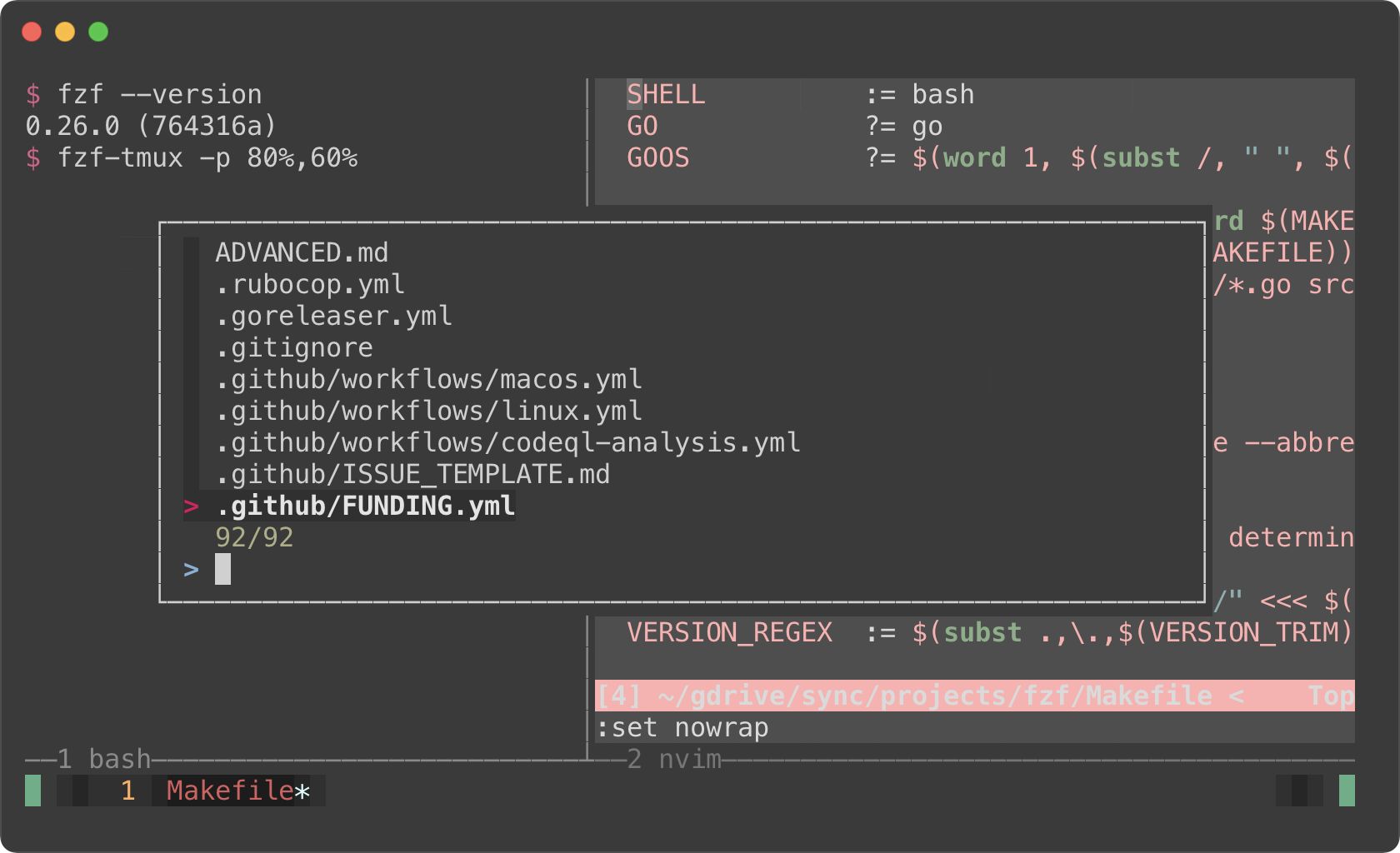 - -> You might also want to check out my tmux plugins which support this popup -> window layout. -> -> - https://github.com/junegunn/tmux-fzf-url -> - https://github.com/junegunn/tmux-fzf-maccy - -Dynamic reloading of the list ------------------------------ - -fzf can dynamically update the candidate list using an arbitrary program with -`reload` bindings (The design document for `reload` can be found -[here][reload]). - -[reload]: https://github.com/junegunn/fzf/issues/1750 - -### Updating the list of processes by pressing CTRL-R - -This example shows how you can set up a binding for dynamically updating the -list without restarting fzf. - -```sh -(date; ps -ef) | - fzf --bind='ctrl-r:reload(date; ps -ef)' \ - --header=$'Press CTRL-R to reload\n\n' --header-lines=2 \ - --preview='echo {}' --preview-window=down,3,wrap \ - --layout=reverse --height=80% | awk '{print $2}' | xargs kill -9 -``` - -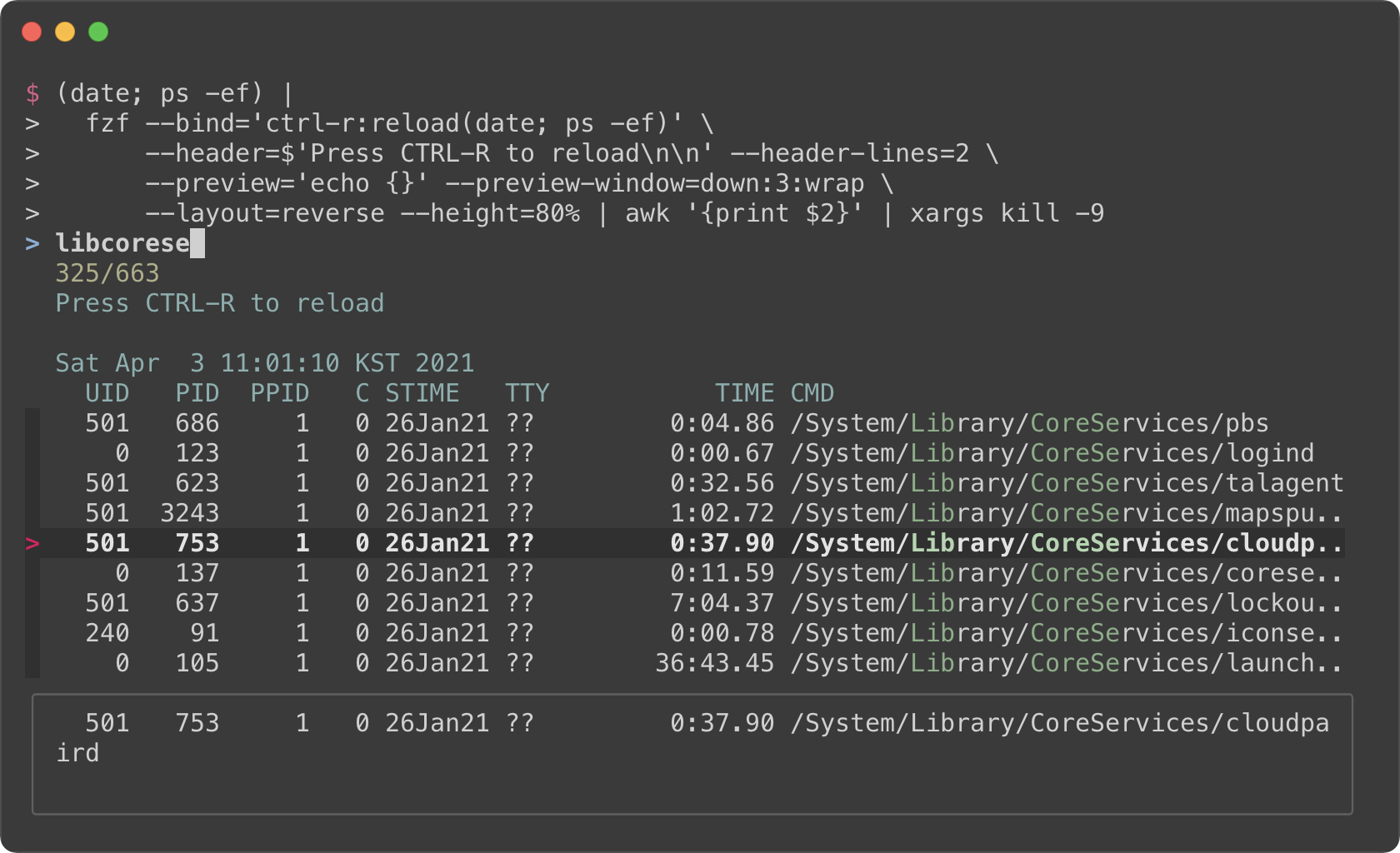 - -- The initial command is `(date; ps -ef)`. It prints the current date and - time, and the list of the processes. -- With `--header` option, you can show any message as the fixed header. -- To disallow selecting the first two lines (`date` and `ps` header), we use - `--header-lines=2` option. -- `--bind='ctrl-r:reload(date; ps -ef)'` binds CTRL-R to `reload` action that - runs `date; ps -ef`, so we can update the list of the processes by pressing - CTRL-R. -- We use simple `echo {}` preview option, so we can see the entire line on the - preview window below even if it's too long - -### Toggling between data sources - -You're not limited to just one reload binding. Set up multiple bindings so -you can switch between data sources. - -```sh -find * | fzf --prompt 'All> ' \ - --header 'CTRL-D: Directories / CTRL-F: Files' \ - --bind 'ctrl-d:change-prompt(Directories> )+reload(find * -type d)' \ - --bind 'ctrl-f:change-prompt(Files> )+reload(find * -type f)' -``` - -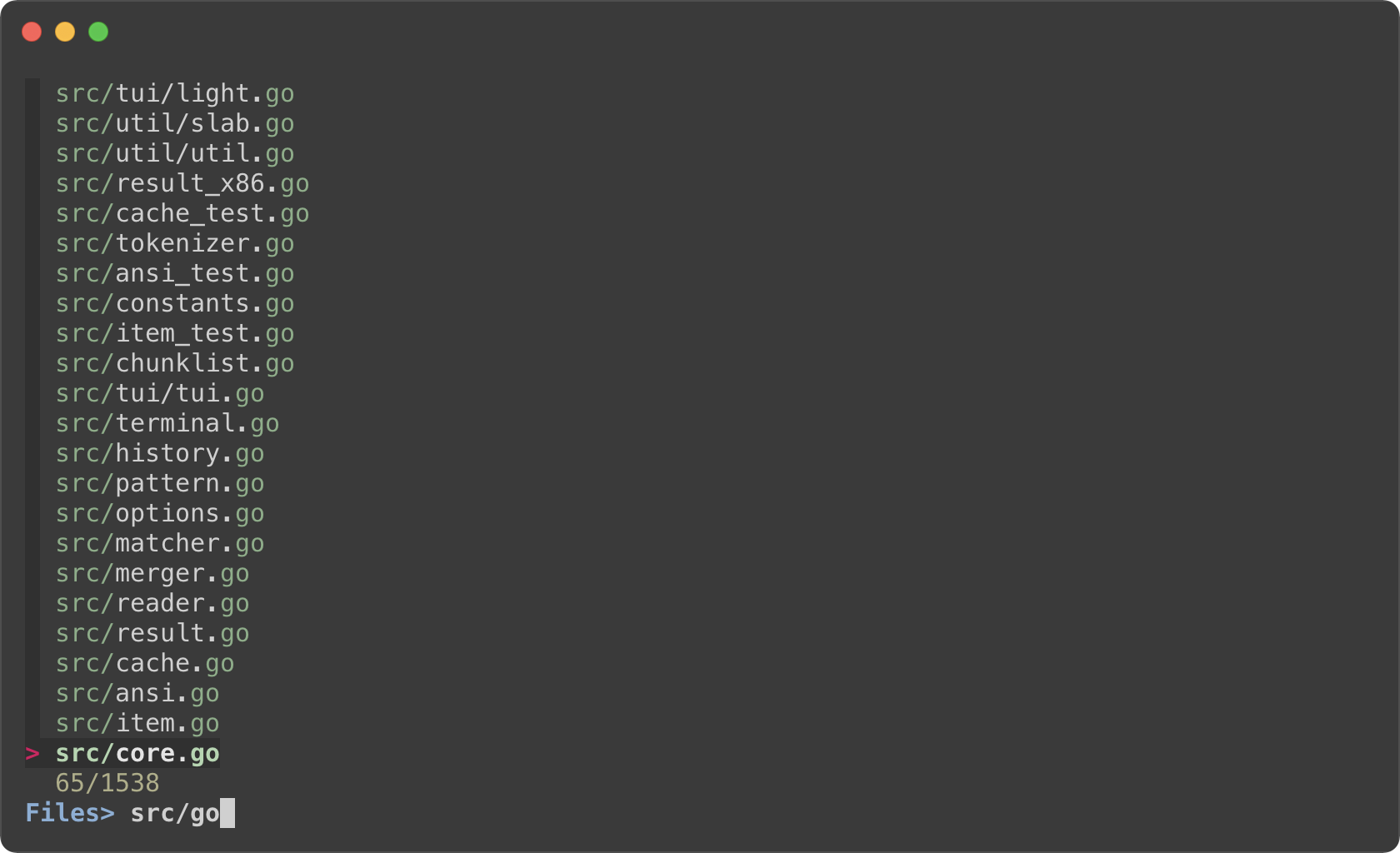 - -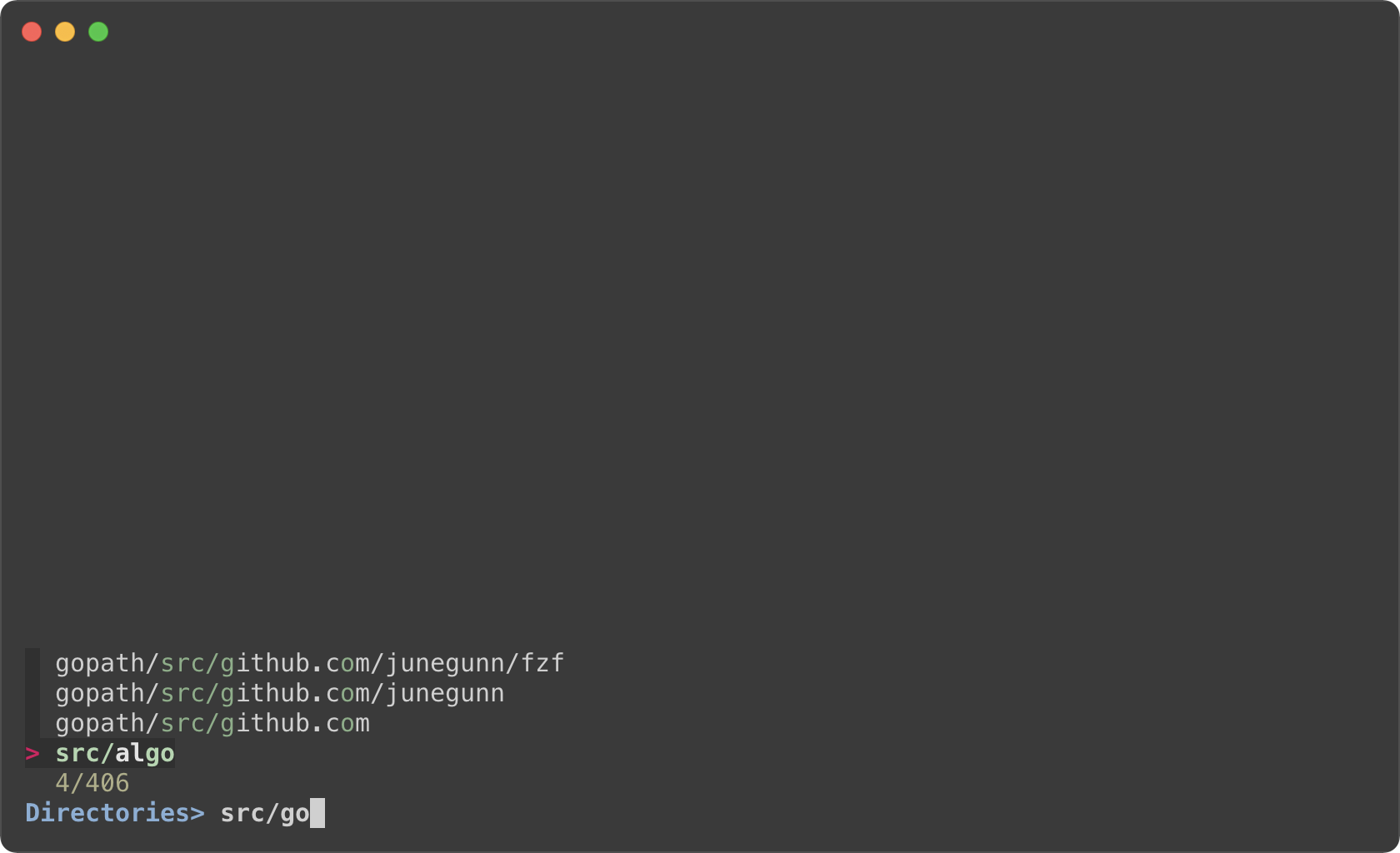 - -Ripgrep integration -------------------- - -### Using fzf as the secondary filter - -* Requires [bat][bat] -* Requires [Ripgrep][rg] - -[bat]: https://github.com/sharkdp/bat -[rg]: https://github.com/BurntSushi/ripgrep - -fzf is pretty fast for filtering a list that you will rarely have to think -about its performance. But it is not the right tool for searching for text -inside many large files, and in that case you should definitely use something -like [Ripgrep][rg]. - -In the next example, Ripgrep is the primary filter that searches for the given -text in files, and fzf is used as the secondary fuzzy filter that adds -interactivity to the workflow. And we use [bat][bat] to show the matching line in -the preview window. - -This is a bash script and it will not run as expected on other non-compliant -shells. To avoid the compatibility issue, let's save this snippet as a script -file called `rfv`. - -```bash -#!/usr/bin/env bash - -# 1. Search for text in files using Ripgrep -# 2. Interactively narrow down the list using fzf -# 3. Open the file in Vim -IFS=: read -ra selected < <( - rg --color=always --line-number --no-heading --smart-case "${*:-}" | - fzf --ansi \ - --color "hl:-1:underline,hl+:-1:underline:reverse" \ - --delimiter : \ - --preview 'bat --color=always {1} --highlight-line {2}' \ - --preview-window 'up,60%,border-bottom,+{2}+3/3,~3' -) -[ -n "${selected[0]}" ] && vim "${selected[0]}" "+${selected[1]}" -``` - -And run it with an initial query string. - -```sh -# Make the script executable -chmod +x rfv - -# Run it with the initial query "algo" -./rfv algo -``` - -> Ripgrep will perform the initial search and list all the lines that contain -`algo`. Then we further narrow down the list on fzf. - -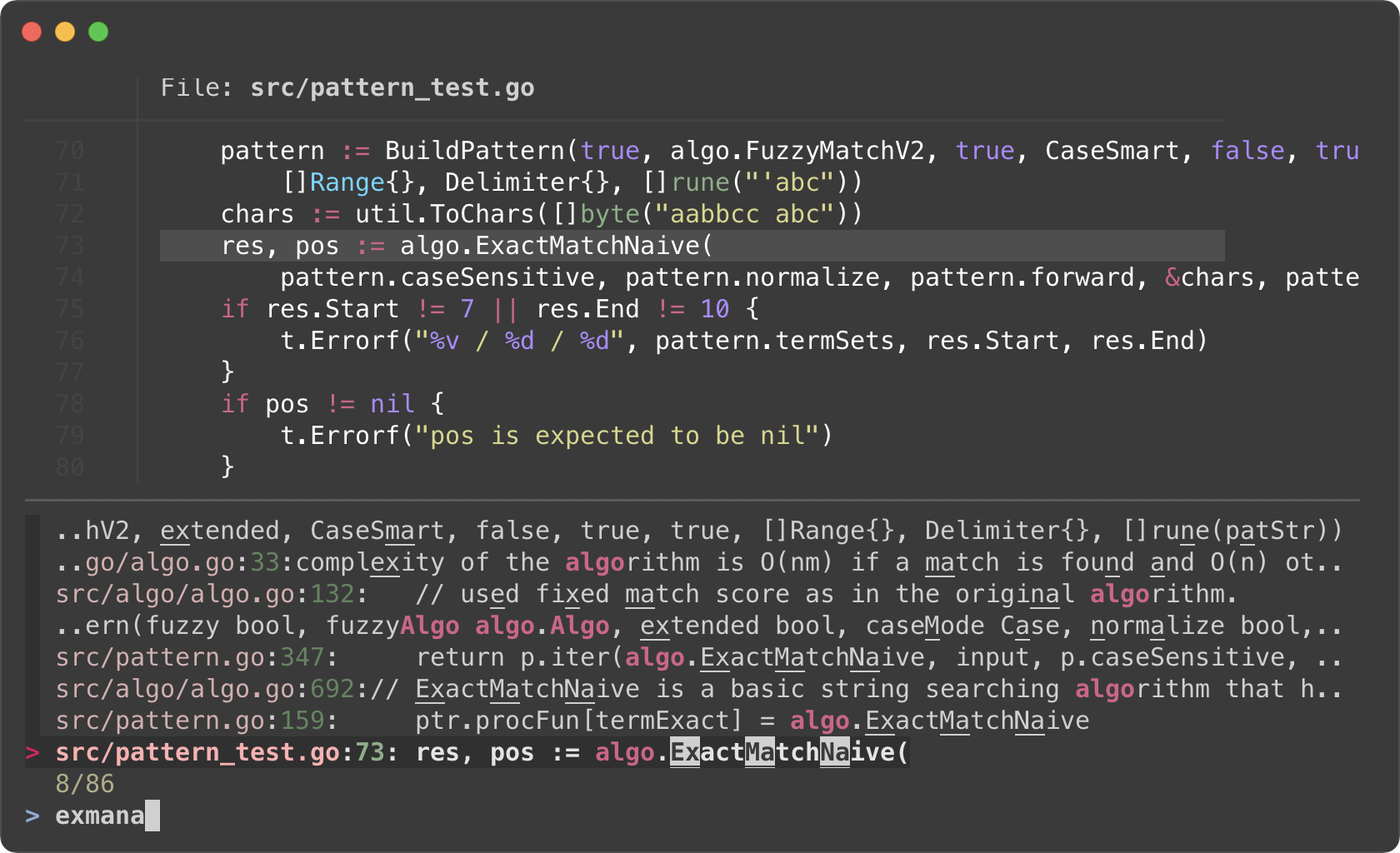 - -I know it's a lot to digest, let's try to break down the code. - -- Ripgrep prints the matching lines in the following format - ``` - man/man1/fzf.1:54:.BI "--algo=" TYPE - man/man1/fzf.1:55:Fuzzy matching algorithm (default: v2) - man/man1/fzf.1:58:.BR v2 " Optimal scoring algorithm (quality)" - src/pattern_test.go:7: "github.com/junegunn/fzf/src/algo" - ``` - The first token delimited by `:` is the file path, and the second token is - the line number of the matching line. They respectively correspond to `{1}` - and `{2}` in the preview command. - - `--preview 'bat --color=always {1} --highlight-line {2}'` -- As we run `rg` with `--color=always` option, we should tell fzf to parse - ANSI color codes in the input by setting `--ansi`. -- We customize how fzf colors various text elements using `--color` option. - `-1` tells fzf to keep the original color from the input. See `man fzf` for - available color options. -- The value of `--preview-window` option consists of 5 components delimited - by `,` - 1. `up` — Position of the preview window - 1. `60%` — Size of the preview window - 1. `border-bottom` — Preview window border only on the bottom side - 1. `+{2}+3/3` — Scroll offset of the preview contents - 1. `~3` — Fixed header -- Let's break down the latter two. We want to display the bat output in the - preview window with a certain scroll offset so that the matching line is - positioned near the center of the preview window. - - `+{2}` — The base offset is extracted from the second token - - `+3` — We add 3 lines to the base offset to compensate for the header - part of `bat` output - - ``` - ───────┬────────────────────────────────────────────────────────── - │ File: CHANGELOG.md - ───────┼────────────────────────────────────────────────────────── - 1 │ CHANGELOG - 2 │ ========= - 3 │ - 4 │ 0.26.0 - 5 │ ------ - ``` - - `/3` adjusts the offset so that the matching line is shown at a third - position in the window - - `~3` makes the top three lines fixed header so that they are always - visible regardless of the scroll offset -- Once we selected a line, we open the file with `vim` (`vim - "${selected[0]}"`) and move the cursor to the line (`+${selected[1]}`). - -### Using fzf as interative Ripgrep launcher - -We have learned that we can bind `reload` action to a key (e.g. -`--bind=ctrl-r:execute(ps -ef)`). In the next example, we are going to **bind -`reload` action to `change` event** so that whenever the user *changes* the -query string on fzf, `reload` action is triggered. - -Here is a variation of the above `rfv` script. fzf will restart Ripgrep every -time the user updates the query string on fzf. Searching and filtering is -completely done by Ripgrep, and fzf merely provides the interactive interface. -So we lose the "fuzziness", but the performance will be better on larger -projects, and it will free up memory as you narrow down the results. - -```bash -#!/usr/bin/env bash - -# 1. Search for text in files using Ripgrep -# 2. Interactively restart Ripgrep with reload action -# 3. Open the file in Vim -RG_PREFIX="rg --column --line-number --no-heading --color=always --smart-case " -INITIAL_QUERY="${*:-}" -IFS=: read -ra selected < <( - FZF_DEFAULT_COMMAND="$RG_PREFIX $(printf %q "$INITIAL_QUERY")" \ - fzf --ansi \ - --disabled --query "$INITIAL_QUERY" \ - --bind "change:reload:sleep 0.1; $RG_PREFIX {q} || true" \ - --delimiter : \ - --preview 'bat --color=always {1} --highlight-line {2}' \ - --preview-window 'up,60%,border-bottom,+{2}+3/3,~3' -) -[ -n "${selected[0]}" ] && vim "${selected[0]}" "+${selected[1]}" -``` - -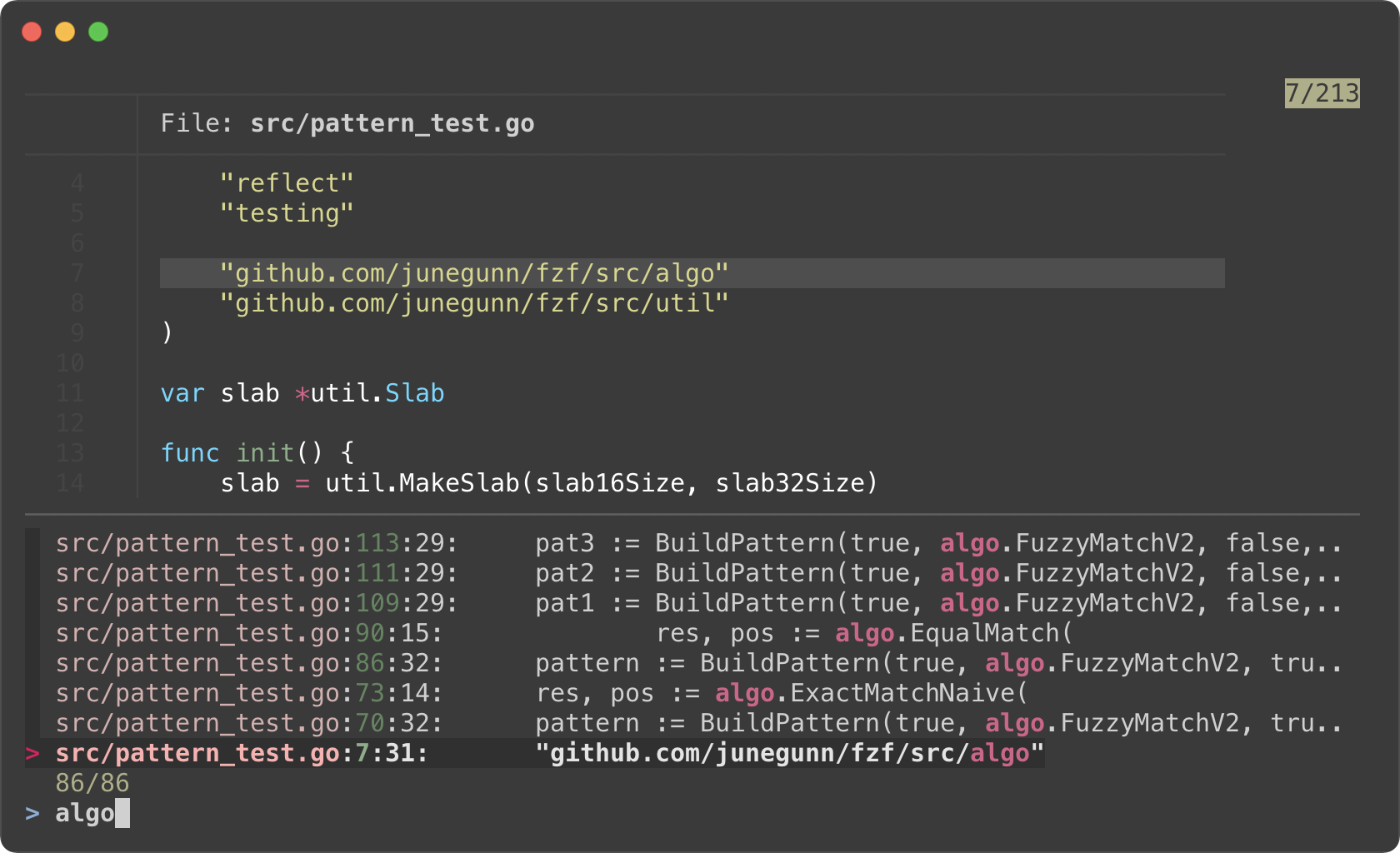 - -- Instead of starting fzf in `rg ... | fzf` form, we start fzf without an - explicit input, but with a custom `FZF_DEFAULT_COMMAND` variable. This way - fzf can kill the initial Ripgrep process it starts with the initial query. - Otherwise, the initial Ripgrep process will keep consuming system resources - even after `reload` is triggered. -- Filtering is no longer a responsibility of fzf; hence `--disabled` -- `{q}` in the reload command evaluates to the query string on fzf prompt. -- `sleep 0.1` in the reload command is for "debouncing". This small delay will - reduce the number of intermediate Ripgrep processes while we're typing in - a query. - -### Switching to fzf-only search mode - -*(Requires fzf 0.27.1 or above)* - -In the previous example, we lost fuzzy matching capability as we completely -delegated search functionality to Ripgrep. But we can dynamically switch to -fzf-only search mode by *"unbinding"* `reload` action from `change` event. - -```sh -#!/usr/bin/env bash - -# Two-phase filtering with Ripgrep and fzf -# -# 1. Search for text in files using Ripgrep -# 2. Interactively restart Ripgrep with reload action -# * Press alt-enter to switch to fzf-only filtering -# 3. Open the file in Vim -RG_PREFIX="rg --column --line-number --no-heading --color=always --smart-case " -INITIAL_QUERY="${*:-}" -IFS=: read -ra selected < <( - FZF_DEFAULT_COMMAND="$RG_PREFIX $(printf %q "$INITIAL_QUERY")" \ - fzf --ansi \ - --color "hl:-1:underline,hl+:-1:underline:reverse" \ - --disabled --query "$INITIAL_QUERY" \ - --bind "change:reload:sleep 0.1; $RG_PREFIX {q} || true" \ - --bind "alt-enter:unbind(change,alt-enter)+change-prompt(2. fzf> )+enable-search+clear-query" \ - --prompt '1. ripgrep> ' \ - --delimiter : \ - --preview 'bat --color=always {1} --highlight-line {2}' \ - --preview-window 'up,60%,border-bottom,+{2}+3/3,~3' -) -[ -n "${selected[0]}" ] && vim "${selected[0]}" "+${selected[1]}" -``` - -* Phase 1. Filtering with Ripgrep -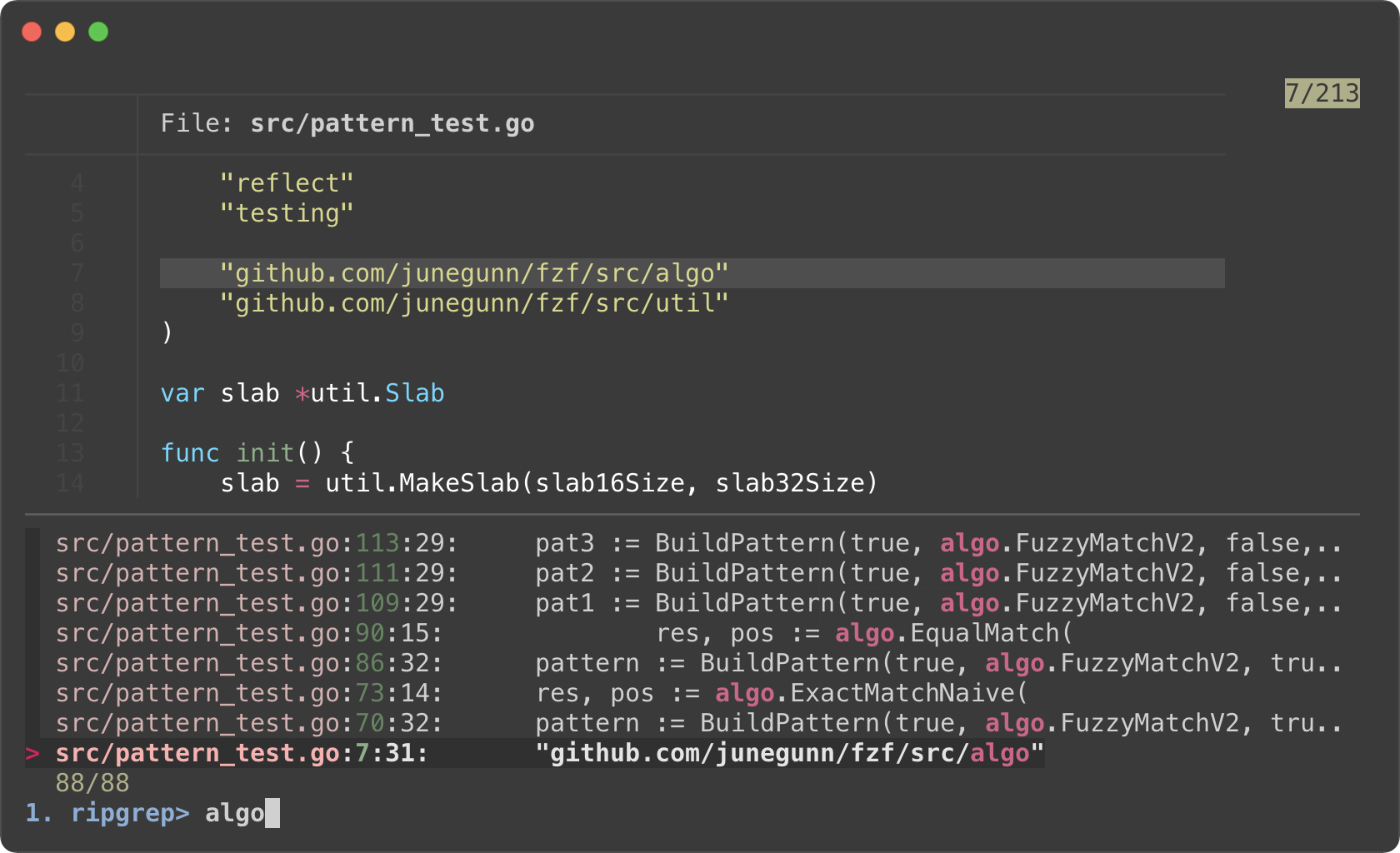 -* Phase 2. Filtering with fzf -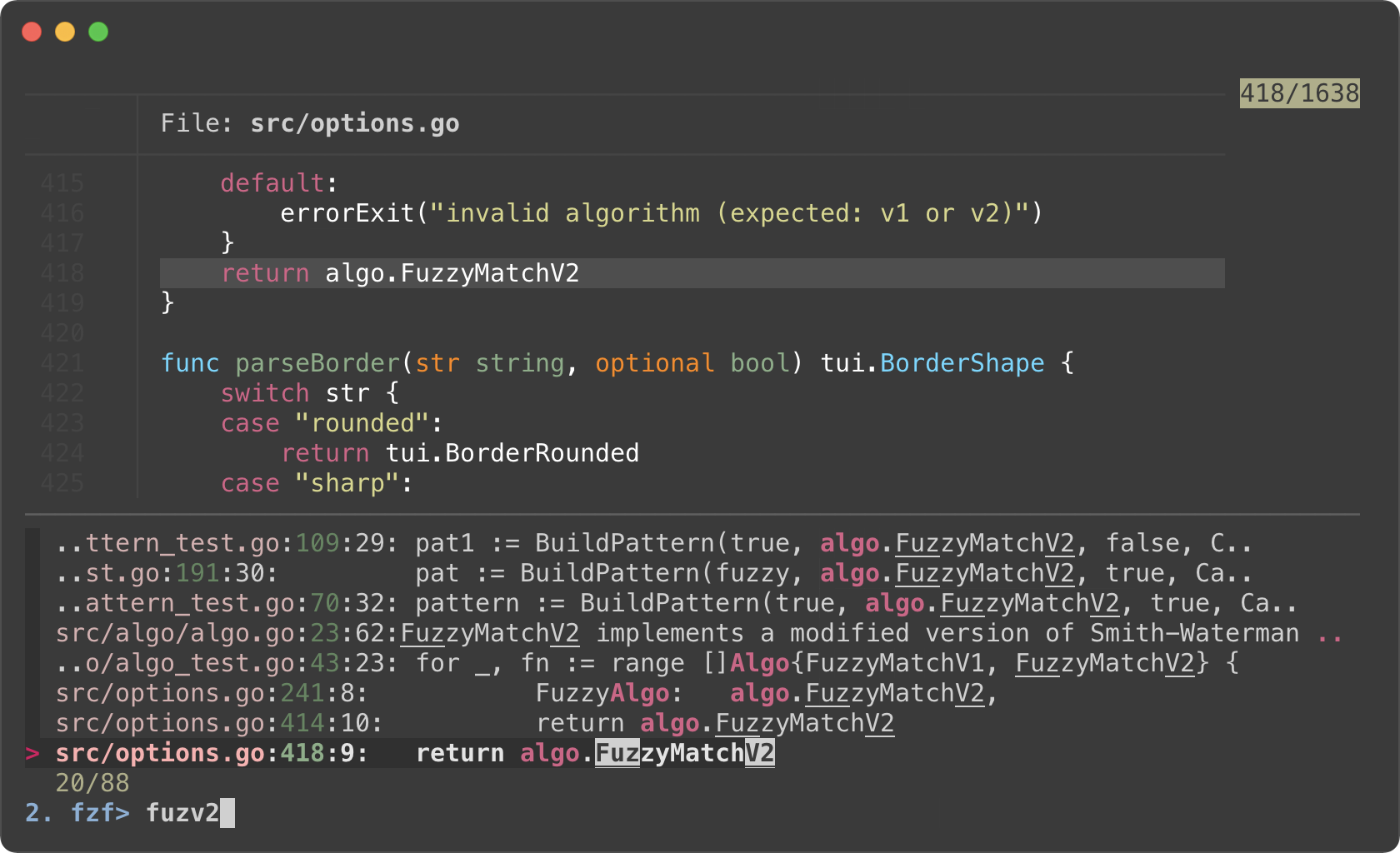 - -- We added `--prompt` option to show that fzf is initially running in "Ripgrep - launcher mode". -- We added `alt-enter` binding that - 1. unbinds `change` event, so Ripgrep is no longer restarted on key press - 2. changes the prompt to `2. fzf>` - 3. enables search functionality of fzf - 4. clears the current query string that was used to start Ripgrep process - 5. and unbinds `alt-enter` itself as this is a one-off event -- We reverted `--color` option for customizing how the matching chunks are - displayed in the second phase - -### Switching between Ripgrep mode and fzf mode - -*(Requires fzf 0.30.0 or above)* - -fzf 0.30.0 added `rebind` action so we can "rebind" the bindings that were -previously "unbound" via `unbind`. - -This is an improved version of the previous example that allows us to switch -between Ripgrep launcher mode and fzf-only filtering mode via CTRL-R and -CTRL-F. - -```sh -#!/usr/bin/env bash - -# Switch between Ripgrep launcher mode (CTRL-R) and fzf filtering mode (CTRL-F) -RG_PREFIX="rg --column --line-number --no-heading --color=always --smart-case " -INITIAL_QUERY="${*:-}" -IFS=: read -ra selected < <( - FZF_DEFAULT_COMMAND="$RG_PREFIX $(printf %q "$INITIAL_QUERY")" \ - fzf --ansi \ - --color "hl:-1:underline,hl+:-1:underline:reverse" \ - --disabled --query "$INITIAL_QUERY" \ - --bind "change:reload:sleep 0.1; $RG_PREFIX {q} || true" \ - --bind "ctrl-f:unbind(change,ctrl-f)+change-prompt(2. fzf> )+enable-search+clear-query+rebind(ctrl-r)" \ - --bind "ctrl-r:unbind(ctrl-r)+change-prompt(1. ripgrep> )+disable-search+reload($RG_PREFIX {q} || true)+rebind(change,ctrl-f)" \ - --prompt '1. Ripgrep> ' \ - --delimiter : \ - --header '╱ CTRL-R (Ripgrep mode) ╱ CTRL-F (fzf mode) ╱' \ - --preview 'bat --color=always {1} --highlight-line {2}' \ - --preview-window 'up,60%,border-bottom,+{2}+3/3,~3' -) -[ -n "${selected[0]}" ] && vim "${selected[0]}" "+${selected[1]}" -``` - -Log tailing ------------ - -fzf can run long-running preview commands and render partial results before -completion. And when you specify `follow` flag in `--preview-window` option, -fzf will "`tail -f`" the result, automatically scrolling to the bottom. - -```bash -# With "follow", preview window will automatically scroll to the bottom. -# "\033[2J" is an ANSI escape sequence for clearing the screen. -# When fzf reads this code it clears the previous preview contents. -fzf --preview-window follow --preview 'for i in $(seq 100000); do - echo "$i" - sleep 0.01 - (( i % 300 == 0 )) && printf "\033[2J" -done' -``` - -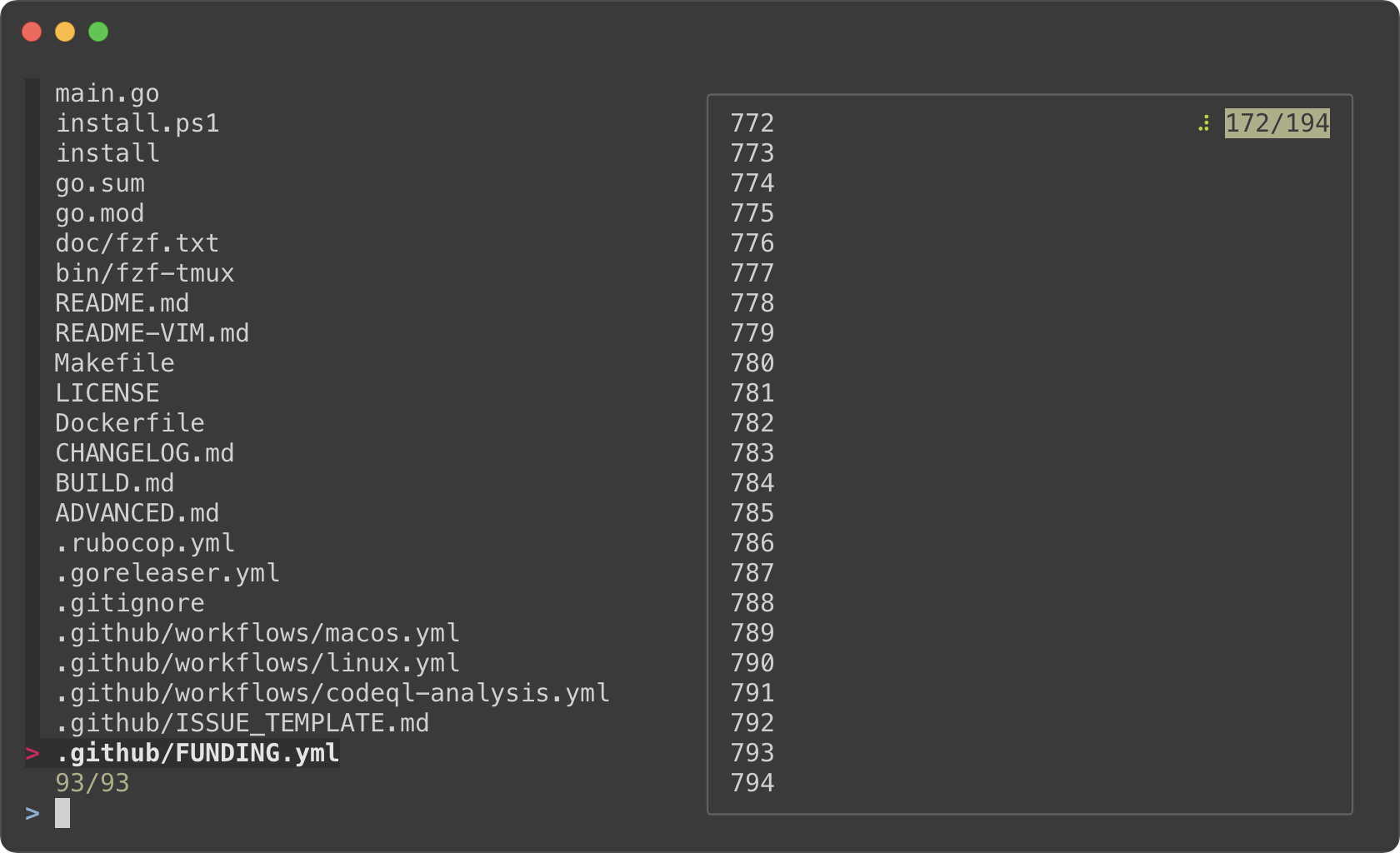 - -Admittedly, that was a silly example. Here's a practical one for browsing -Kubernetes pods. - -```bash -pods() { - FZF_DEFAULT_COMMAND="kubectl get pods --all-namespaces" \ - fzf --info=inline --layout=reverse --header-lines=1 \ - --prompt "$(kubectl config current-context | sed 's/-context$//')> " \ - --header $'╱ Enter (kubectl exec) ╱ CTRL-O (open log in editor) ╱ CTRL-R (reload) ╱\n\n' \ - --bind 'ctrl-/:change-preview-window(80%,border-bottom|hidden|)' \ - --bind 'enter:execute:kubectl exec -it --namespace {1} {2} -- bash > /dev/tty' \ - --bind 'ctrl-o:execute:${EDITOR:-vim} <(kubectl logs --all-containers --namespace {1} {2}) > /dev/tty' \ - --bind 'ctrl-r:reload:$FZF_DEFAULT_COMMAND' \ - --preview-window up:follow \ - --preview 'kubectl logs --follow --all-containers --tail=10000 --namespace {1} {2}' "$@" -} -``` - -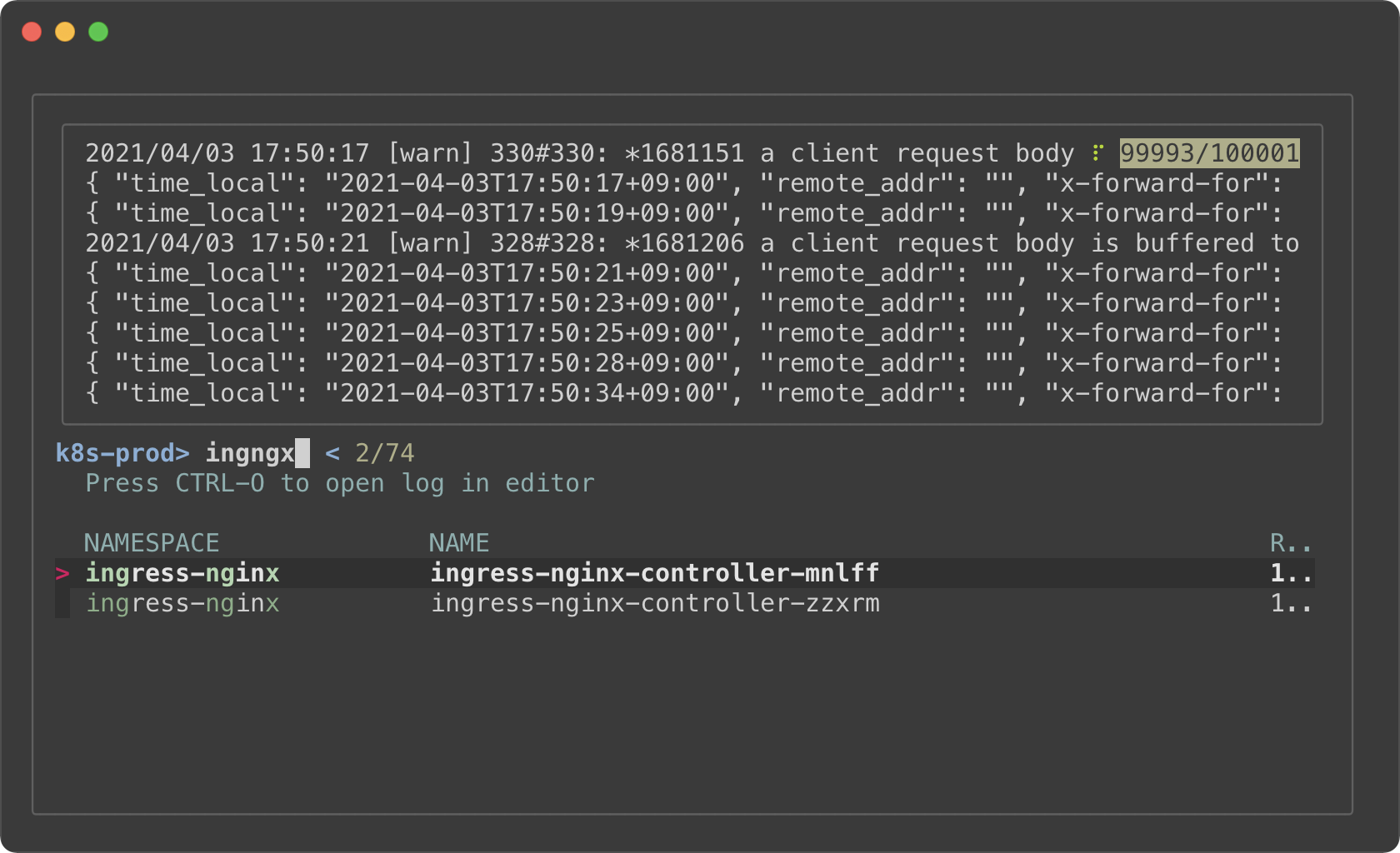 - -- The preview window will *"log tail"* the pod - - Holding on to a large amount of log will consume a lot of memory. So we - limited the initial log amount with `--tail=10000`. -- `execute` bindings allow you to run any command without leaving fzf - - Press enter key on a pod to `kubectl exec` into it - - Press CTRL-O to open the log in your editor -- Press CTRL-R to reload the pod list -- Press CTRL-/ repeatedly to to rotate through a different sets of preview - window options - 1. `80%,border-bottom` - 1. `hidden` - 1. Empty string after `|` translates to the default options from `--preview-window` - -Key bindings for git objects ----------------------------- - -Oftentimes, you want to put the identifiers of various Git object to the -command-line. For example, it is common to write commands like these: - -```sh -git checkout [SOME_COMMIT_HASH or BRANCH or TAG] -git diff [SOME_COMMIT_HASH or BRANCH or TAG] [SOME_COMMIT_HASH or BRANCH or TAG] -``` - -[fzf-git.sh](https://github.com/junegunn/fzf-git.sh) project defines a set of -fzf-based key bindings for Git objects. I strongly recommend that you check -them out because they are seriously useful. - -### Files listed in `git status` - -<kbd>CTRL-G</kbd><kbd>CTRL-F</kbd> - -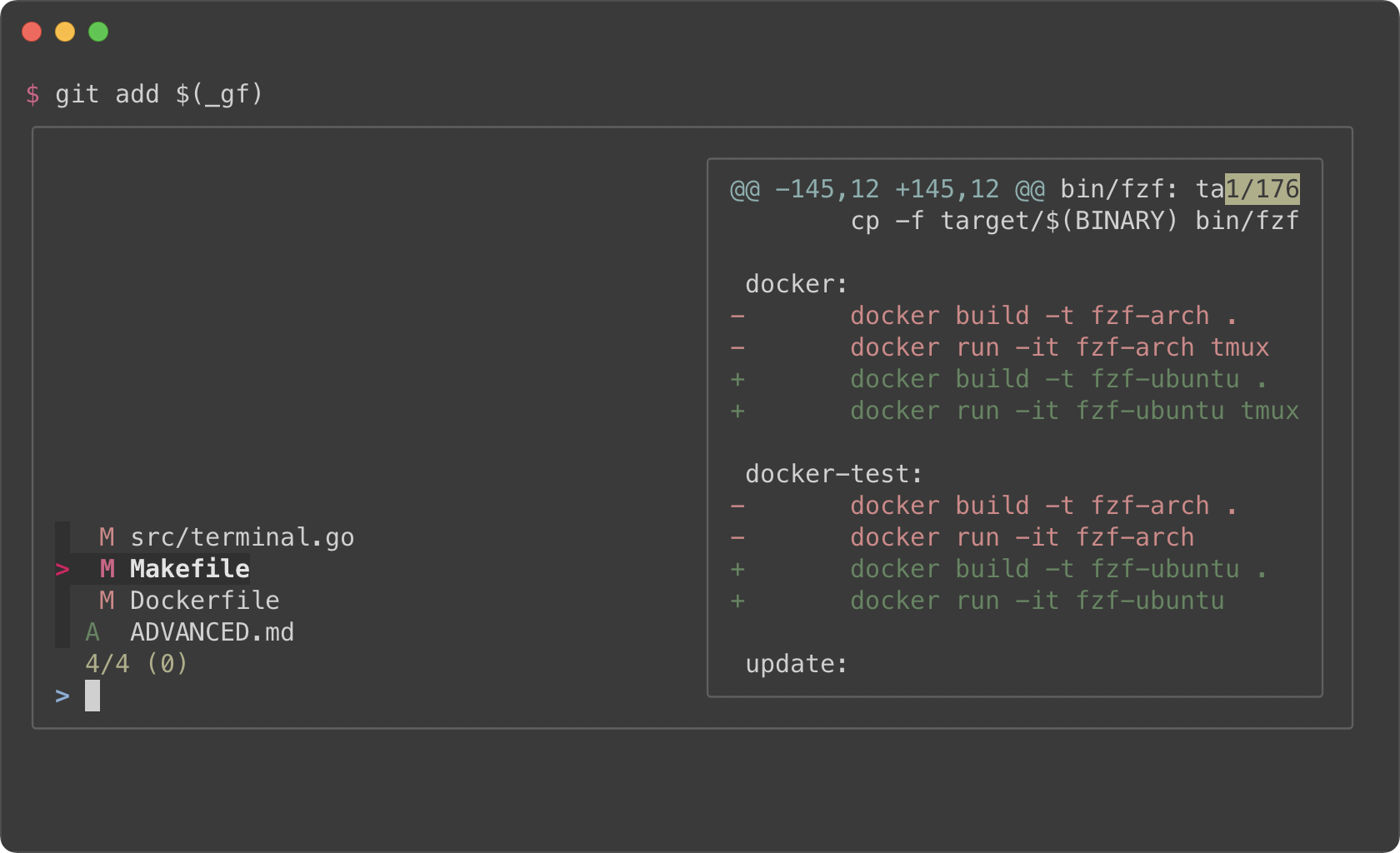 - -### Branches - -<kbd>CTRL-G</kbd><kbd>CTRL-B</kbd> - -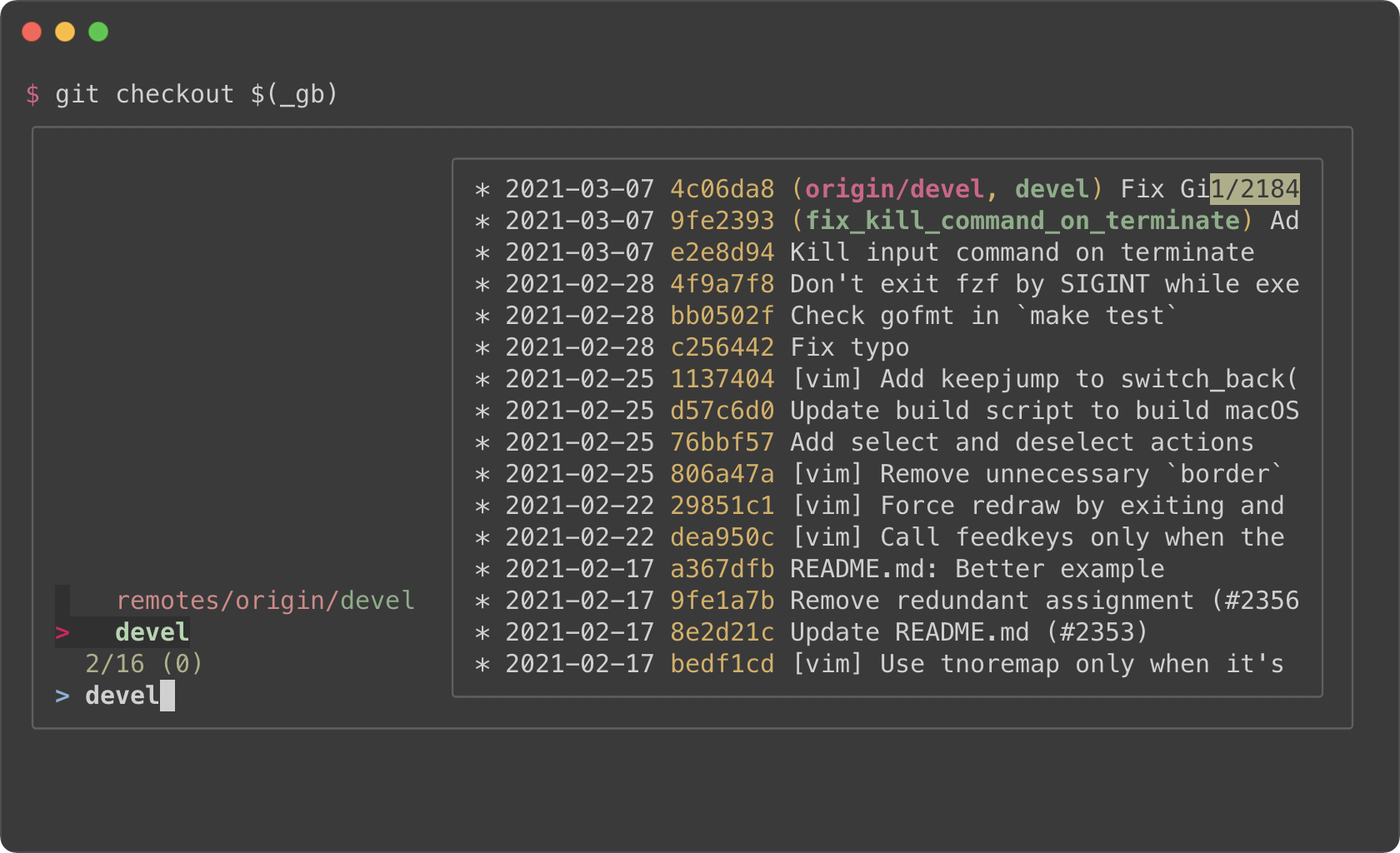 - -### Commit hashes - -<kbd>CTRL-G</kbd><kbd>CTRL-H</kbd> - -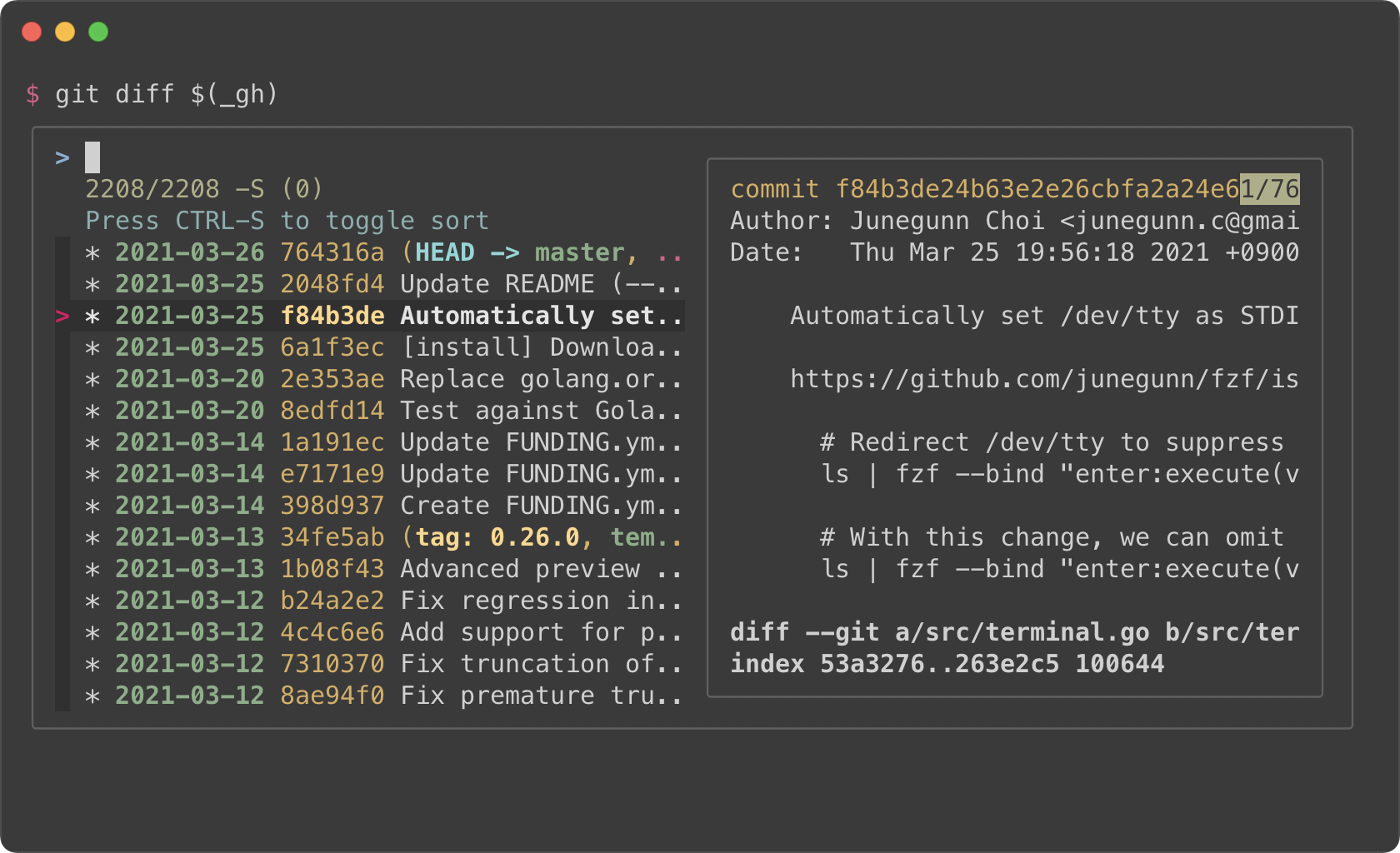 - -Color themes ------------- - -You can customize how fzf colors the text elements with `--color` option. Here -are a few color themes. Note that you need a terminal emulator that can -display 24-bit colors. - -```sh -# junegunn/seoul256.vim (dark) -export FZF_DEFAULT_OPTS='--color=bg+:#3F3F3F,bg:#4B4B4B,border:#6B6B6B,spinner:#98BC99,hl:#719872,fg:#D9D9D9,header:#719872,info:#BDBB72,pointer:#E12672,marker:#E17899,fg+:#D9D9D9,preview-bg:#3F3F3F,prompt:#98BEDE,hl+:#98BC99' -``` - -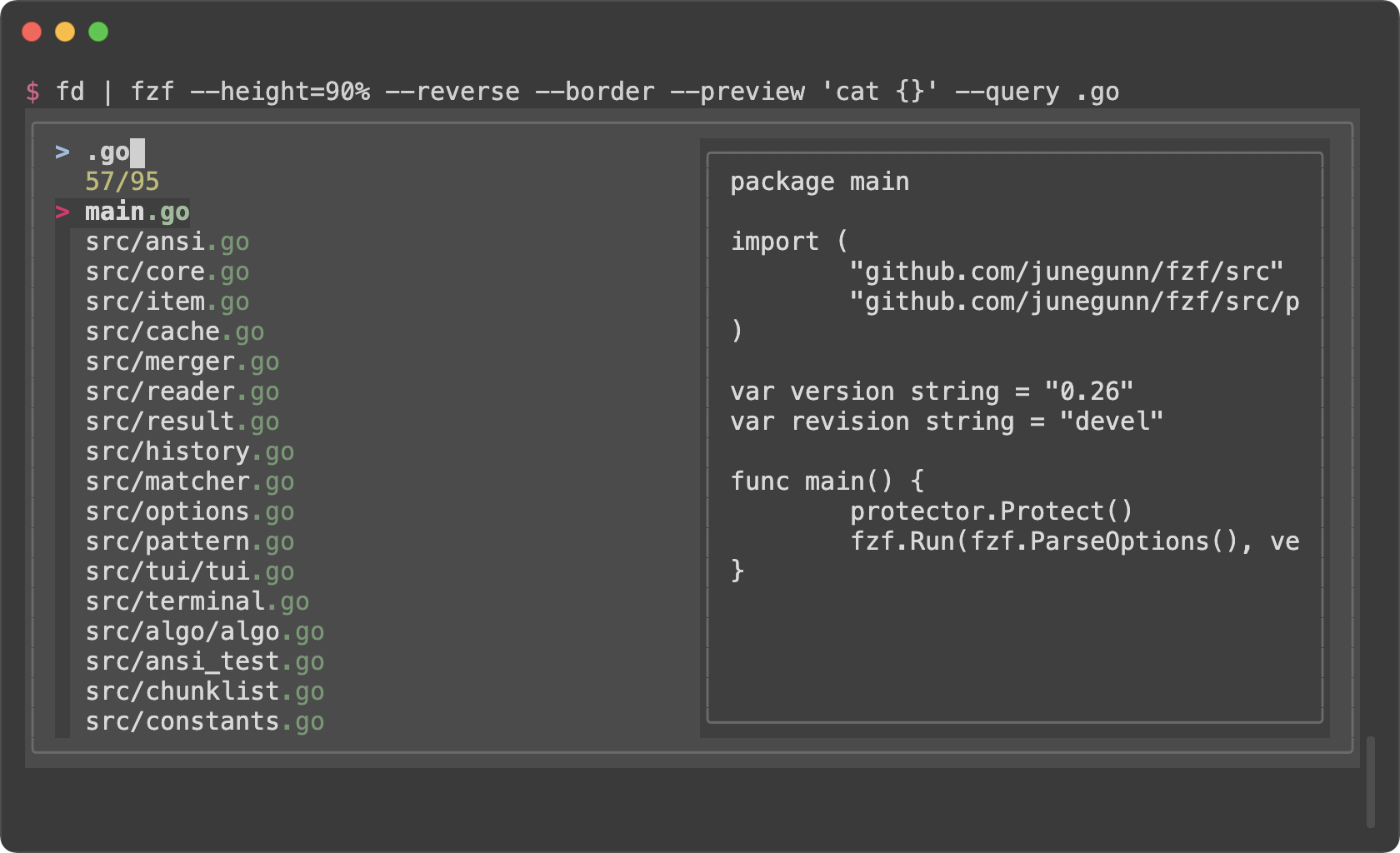 - -```sh -# junegunn/seoul256.vim (light) -export FZF_DEFAULT_OPTS='--color=bg+:#D9D9D9,bg:#E1E1E1,border:#C8C8C8,spinner:#719899,hl:#719872,fg:#616161,header:#719872,info:#727100,pointer:#E12672,marker:#E17899,fg+:#616161,preview-bg:#D9D9D9,prompt:#0099BD,hl+:#719899' -``` - -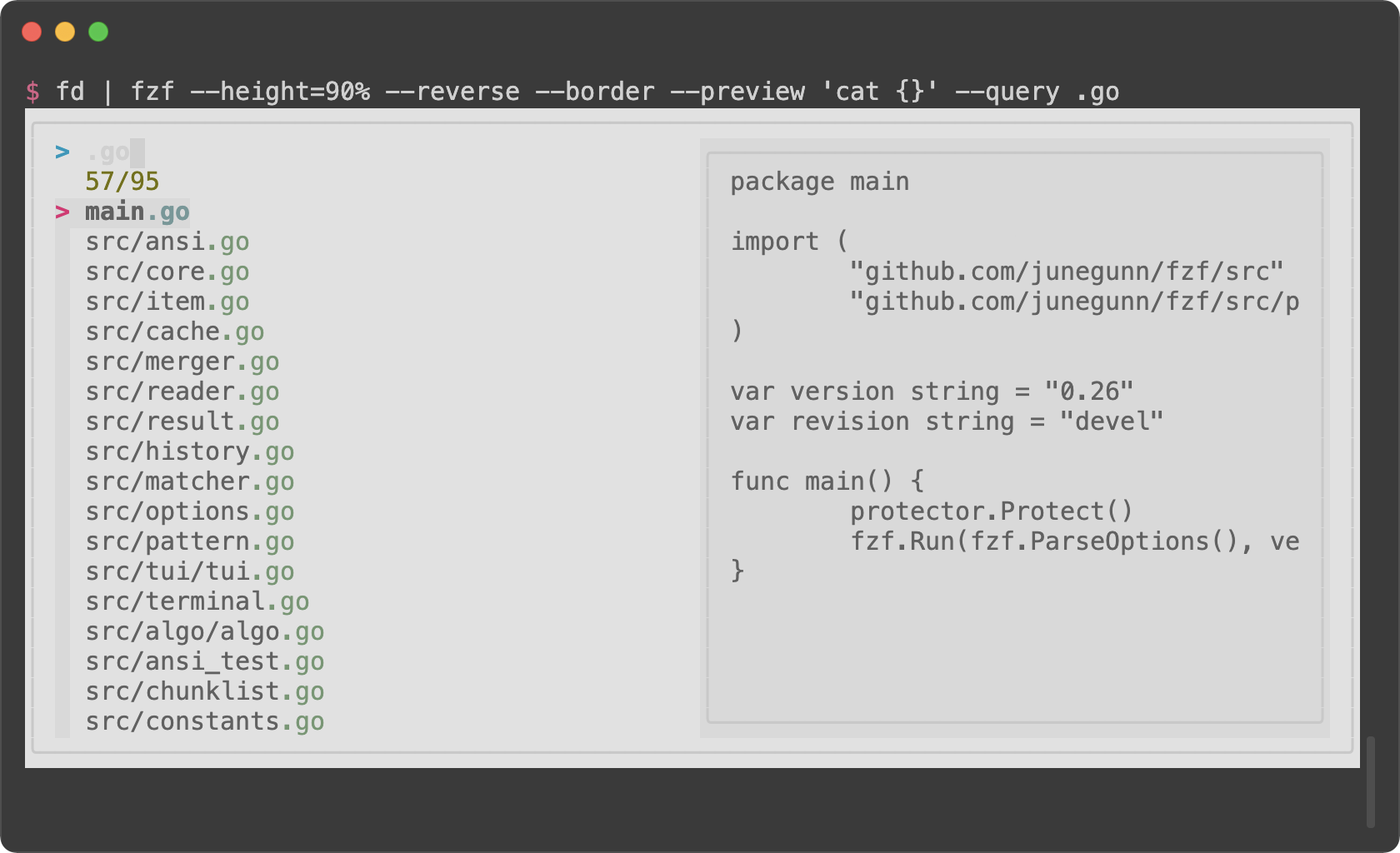 - -```sh -# morhetz/gruvbox -export FZF_DEFAULT_OPTS='--color=bg+:#3c3836,bg:#32302f,spinner:#fb4934,hl:#928374,fg:#ebdbb2,header:#928374,info:#8ec07c,pointer:#fb4934,marker:#fb4934,fg+:#ebdbb2,prompt:#fb4934,hl+:#fb4934' -``` - -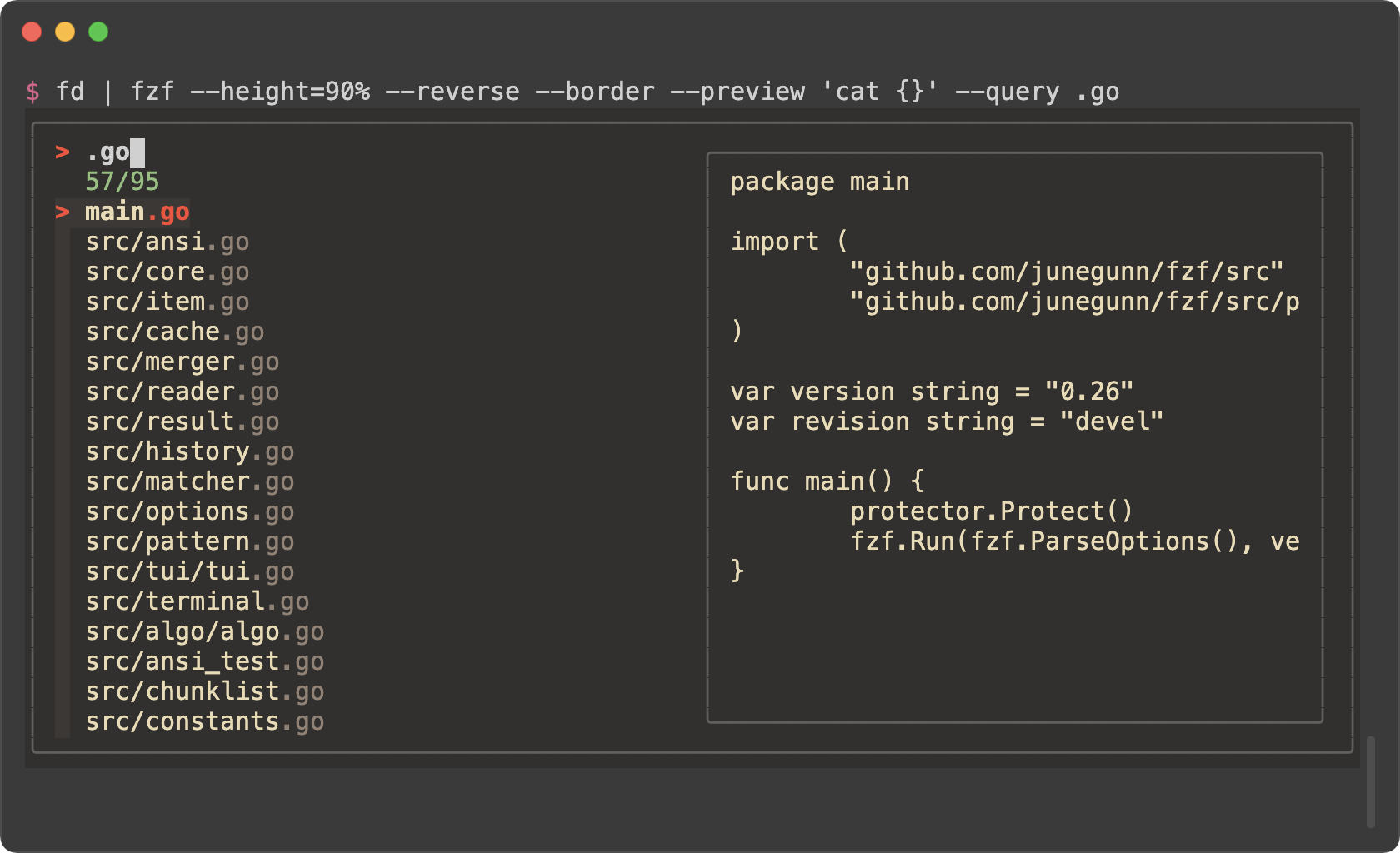 - -```sh -# arcticicestudio/nord-vim -export FZF_DEFAULT_OPTS='--color=bg+:#3B4252,bg:#2E3440,spinner:#81A1C1,hl:#616E88,fg:#D8DEE9,header:#616E88,info:#81A1C1,pointer:#81A1C1,marker:#81A1C1,fg+:#D8DEE9,prompt:#81A1C1,hl+:#81A1C1' -``` - -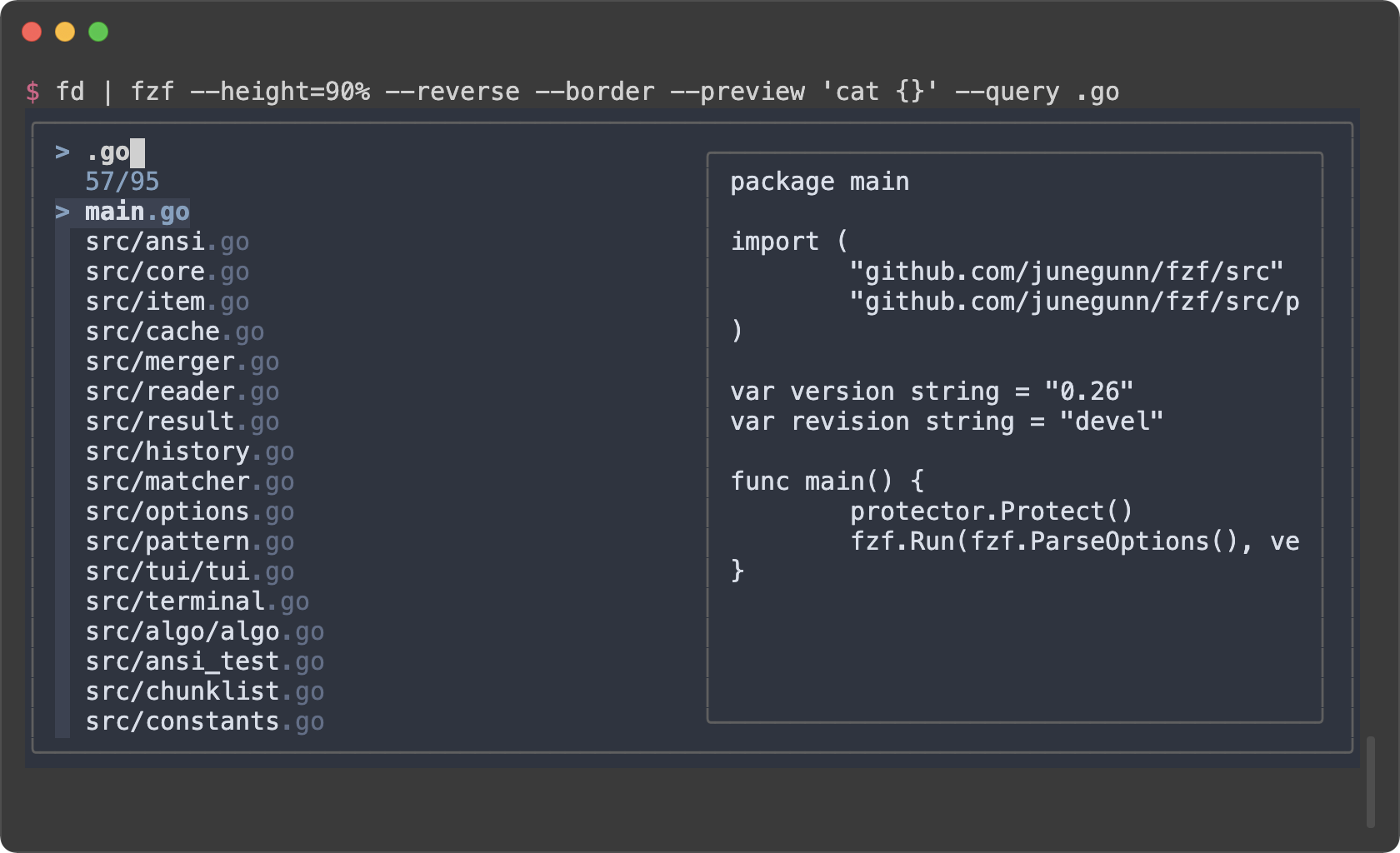 - -```sh -# tomasr/molokai -export FZF_DEFAULT_OPTS='--color=bg+:#293739,bg:#1B1D1E,border:#808080,spinner:#E6DB74,hl:#7E8E91,fg:#F8F8F2,header:#7E8E91,info:#A6E22E,pointer:#A6E22E,marker:#F92672,fg+:#F8F8F2,prompt:#F92672,hl+:#F92672' -``` - -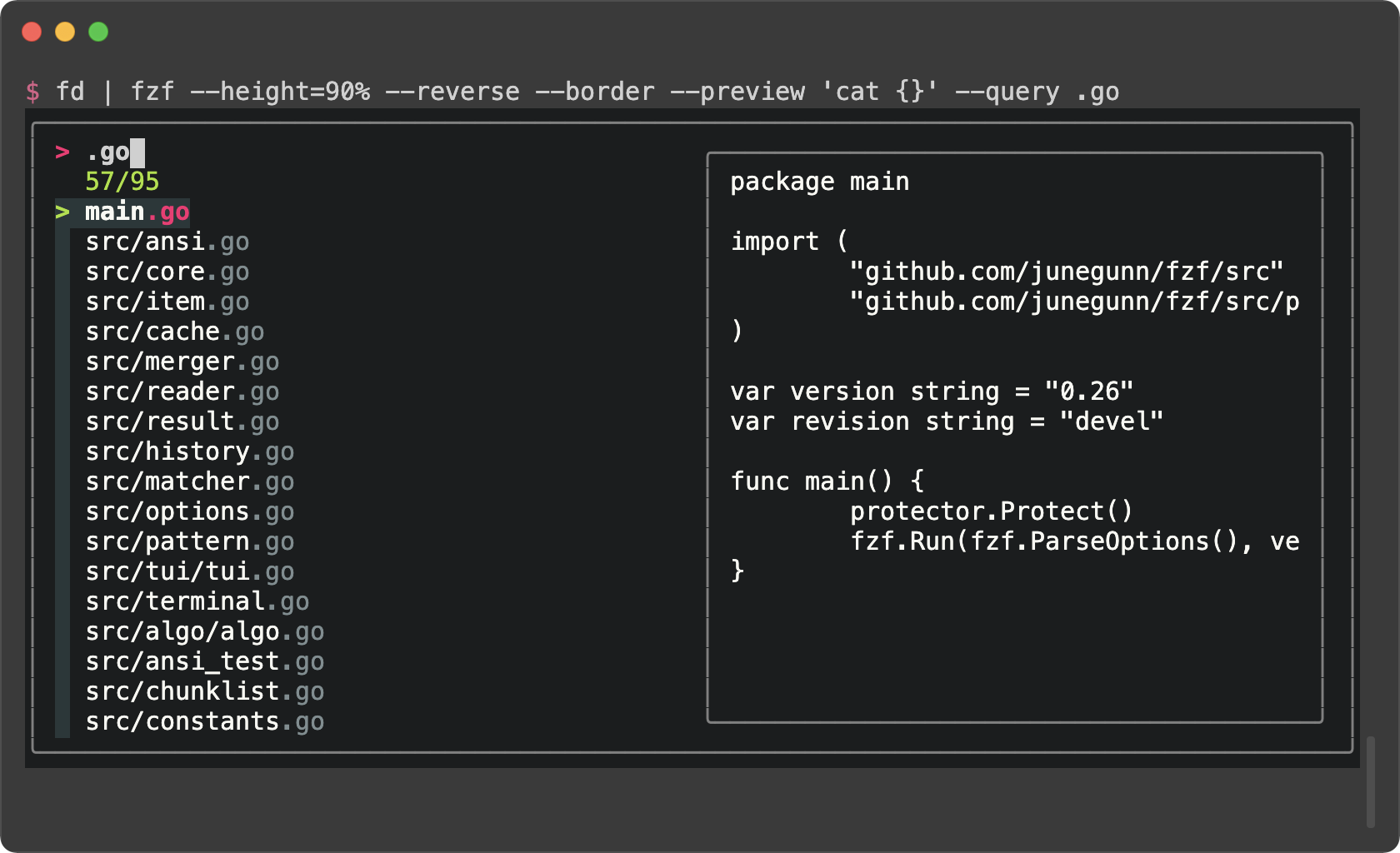 - -### Generating fzf color theme from Vim color schemes - -The Vim plugin of fzf can generate `--color` option from the current color -scheme according to `g:fzf_colors` variable. You can find the detailed -explanation [here](https://github.com/junegunn/fzf/blob/master/README-VIM.md#explanation-of-gfzf_colors). - -Here is an example. Add this to your Vim configuration file. - -```vim -let g:fzf_colors = -\ { 'fg': ['fg', 'Normal'], - \ 'bg': ['bg', 'Normal'], - \ 'preview-bg': ['bg', 'NormalFloat'], - \ 'hl': ['fg', 'Comment'], - \ 'fg+': ['fg', 'CursorLine', 'CursorColumn', 'Normal'], - \ 'bg+': ['bg', 'CursorLine', 'CursorColumn'], - \ 'hl+': ['fg', 'Statement'], - \ 'info': ['fg', 'PreProc'], - \ 'border': ['fg', 'Ignore'], - \ 'prompt': ['fg', 'Conditional'], - \ 'pointer': ['fg', 'Exception'], - \ 'marker': ['fg', 'Keyword'], - \ 'spinner': ['fg', 'Label'], - \ 'header': ['fg', 'Comment'] } -``` - -Then you can see how the `--color` option is generated by printing the result -of `fzf#wrap()`. - -```vim -:echo fzf#wrap() -``` - -Use this command to append `export FZF_DEFAULT_OPTS="..."` line to the end of -the current file. - -```vim -:call append('$', printf('export FZF_DEFAULT_OPTS="%s"', matchstr(fzf#wrap().options, "--color[^']*"))) -``` |